What is organic search visibility? How to measure and improve it


Organic search visibility is a measure of how often a website appears in unpaid (organic) search results on Google and other search engines. High organic search visibility means a site ranks well and consistently appears on relevant search engine results pages (SERPs), making it more likely that your target audience will surface your content.
Organic search visibility is the newer, more future-proof metric to watch instead of keyword rankings. With AI Overviews, map packs, SERP features, Reddit threads, and other AI search updates changing how people find answers on the web, measuring individual keyword rankings is no longer the best way to track how you’re doing in the search results.
Instead, you’ll need to track your overall visibility in the SERPs—how much relevant “real estate” your brand owns in the search engine results.
What is organic search visibility?
For as long as you’ve been an SEO, you’ve probably been tracking keyword rankings. After all, where you ranked in search results for different keywords directly correlated with how much organic traffic you received.
That’s not necessarily the case any longer.
Even if your website is the #1 blue link on the page, the query might be comprehensively answered by an AI Overview. Even worse, it’s possible the AI Overview includes citations and links to other sites instead of yours.
For example, let’s look at the results for the query “how content marketing works.” Notice that the top organic result is pretty far down the page and, even though it ranks #1, is not used as a source in the AI Overview:

Plus, when you expand the AI Overview, you get a huge amount of information without even needing to click anywhere:

If you owned the site in the first organic position and were tracking keyword rankings, you’d see that you rank #1 for this keyword. Unfortunately, without being featured in the AI Overview, that #1 ranking doesn’t mean as much as it used to for visibility and website traffic!
SERPs are also incredibly volatile recently (meaning rankings can change a lot from day to day). According to the Semrush Sensor, volatility has been in the “High” and “Very High” ranges for almost the entire prior 30 days (as of the time of writing):

It’s starting to look like tracking rankings for specific keywords is a bit futile—like throwing darts at a tiny moving target.
Instead, tracking organic search visibility lumps together keywords (either all of your keywords or keywords grouped into related lists) and tracks how visible they are in organic search as a whole.
Think of it this way: If 100 people search for terms related to your business today, how many of them will see your website in their search results? Your visibility score reflects that potential exposure.
The SEO toolkit you know, plus the AI visibility data you need.

How to track organic search visibility
There are many different tools that track organic search visibility, including SEO tools like Semrush and Ahrefs, and analytics tools like DashThis and Invoca.
For example, in Semrush, click on the “Position Tracking” tab:

Don’t have position tracking set up yet? Go ahead and configure position tracking now.
Then, you’ll see a “Visibility” metric in the “Landscape” tab:

To see a more detailed visibility report, click on the “Overview” tab:

A few quick visibility tracking tips:
- Don’t skew your visibility score by tracking too many branded keywords. You’ll likely rank at the top for these anyway, and having those #1 and #2 rankings will make your visibility artificially high.
- A visibility score around 50% is good. Above that is excellent.
- Instead of focusing too much on the exact visibility number, think more about improving it. Improvement is great, no matter the total percent!
Further Reading: SEO Visibility: What It Is & How to Improve It
How visibility differs from other SEO metrics
When you open your Google Search Console dashboard and click on the “Search results” tab, you’ll see the four metrics that Google provides to website owners for tracking their organic visibility:

Those four metrics are clicks, impressions, average click-through rate (CTR), and average position (ranking):

How does search visibility differ from these traditional SEO metrics?
Search Console tracks clicks, impressions, CTR, and position across all of the keywords your site ranks for, not just the relevant keywords you’re targeting and tracking. It also lumps them all together into one report, although you can click the “Pages” tab and click on an individual page URL to see results for just that page:

Search visibility is similar to these metrics, but the main difference between search visibility and, say, total impressions, is that search visibility is a measurement of how visible your website is across a list of relevant keywords (that you control) instead of all you rank in the top 100 results for.
Here’s an example to help you visualize the difference.
Let’s say there are two different pet stores with different websites. The first one ranks #1 or #2 (and in AI Overviews) for five high-volume keywords, like “pet store,” “best dog food,” and “interactive cat toys.” However, this first store doesn’t rank for much else besides those top, high-volume keywords.
The second store ranks for a lot more keywords, but doesn’t rank quite as highly as the first store. Instead, it ranks in positions #3 to #7 (and lower in AI Overviews) for 300 related keywords.
The second store is going to have a higher visibility score because it appears in a lot more relevant search results than the first one does.
How to increase your organic visibility
In the past, optimizing every page and post of a website was enough to increase visibility and clicks. Today, with voice search, AI Overviews, and other SERP features in the mix, it’s not quite so straightforward.
Today, your organic search visibility is highly affected by:
- Topical authority
- The depth, breadth, and freshness of your content
- Presence in SERP features
- Technical SEO and schema
To get more eyeballs on your brand and your content, start by focusing on tactics that build up these four visibility pillars.
Let’s take a look at some of the most important visibility-enhancing tactics.
Topical authority
Topical authority is the level of trust a website earns within its niche by consistently publishing high-quality, in-depth content on a specific subject. Google and other search engines reward sites with strong topical authority by ranking them higher (increasing organic visibility) for related keywords.
Building topical authority requires expertise, consistent updates, and comprehensive topic coverage.
One of the best ways to build topical authority is with content hubs. Content hubs are a series of posts covering a wide range of tightly related topics that are all linked back to one large, central post that covers it all.

Content hubs should include:
- A comprehensive pillar page that covers the topic broadly
- Detailed cluster pages that dive deep into specific subtopics
- Supporting content that answers related questions
- Internal links that connect all related content together
Building content hubs can help you capture search visibility across a much wider range of search queries while establishing your site as an authoritative source on the pillar subject.
Content breadth, depth, and freshness
To build visibility, you don’t want to just create more content for the sake of having more content on your site. Instead, you need to create the right content that demonstrates your expertise across your topic areas and is current with what users are searching for.
To expand your content breadth, keep building those topic clusters that capture visibility across more related long-tail terms.
Start by researching all the questions your audience asks about your main topics. Use a keyword research tool like Semrush, Ahrefs, or Moz Keyword Explorer to dig deep into different topics.
For example, in Semrush’s Keyword Magic Tool, you can search for a seed keyword then click on the “Questions” tab:

Or, try a ChatGPT prompt like this one:
“I’m a [type of business] that offers [brief description of product/service]. I want to understand what questions my target audience is asking so I can better address their needs through my content and marketing.
Please generate a list of the top 15 questions my ideal customers are likely asking online about this topic. Focus on questions that show curiosity, pain points, objections, comparisons, and decision-making considerations.
My ideal customer is [describe your target audience briefly, such as busy parents, small business owners, HR managers, etc.].
Also, group the questions into three to five categories based on intent (e.g., awareness, consideration, decision, objections).
Let me know if I’m missing any key angles to consider.”
You can also create depth by searching for content gaps between your website and your competitors. Find topics that they have visibility for, but you don’t.

For more on searching for keyword gaps, check out this guide on how to perform a content gap analysis.
Finally, keep your content updated for freshness! We mentioned this earlier. Keep fighting content decay and cannibalization.
Presence in SERP features
Since traditional organic results make up a smaller portion of search engine results pages than they used to, you also need to optimize for the SERP features that are taking up more real estate (and often appearing higher on the page than even the #1 listing).
Start by searching the topic or keyword you want to gain visibility for and take note of which SERP features appear. Then, focus on optimizing your content to appear in those specific features.
Optimize for:
AI Overviews
Create clear, concise, authoritative content that directly answers common questions. Use structured formatting with headings and bulleted lists that make it easy for AI to extract and cite your information.
In general, to rank in AI Overviews, you want to:
- Target long-tail keywords
- Create quality content
- Improve your user experience
- Dial in your on-page SEO
- Build backlinks and brand mentions
Learn more about how to rank in AI Overviews.
People Also Ask
Structure your content to answer follow-up questions related to your main topic. These often turn into additional visibility opportunities.
In general, to get mentioned in the “People Also Ask” box, try to:
- Include questions as headings and subheadings
- Answer the questions directly: If your question is “What are AI Overviews?” start your answer with “AI Overviews are…”
- If the question is already in the “People Also Ask” section, format your answer like the existing one that’s ranking
- Optimize images used in the article
Learn more about how to rank in “People Also Ask” results.
Videos and short videos
Have you noticed that many queries bring up not only a “Videos” section, but a newer “Short videos” section, as well? Not only that, but there’s also a newer “What people are saying” section that videos can appear in, too!
Here’s an example search that includes all three video areas:

In general, the “Videos” section shows full-length YouTube videos, the “Short videos” section shows YouTube Shorts, TikTok videos, Instagram reels, Reddit videos, and other short-form videos, and the “What people are saying” section will occasionally display various videos, as well.
To grab these spots with your own videos, try to:
- Optimize video titles, descriptions, and transcripts with your target keywords
- Create detailed video transcripts and add them to your page content
- Use VideoObject schema markup
- Create short videos similar to but better than the ones that are currently appearing for your target query
- Create videos around your most important queries often
- Create custom, eye-catching thumbnails
- Use consistent branding
- Start videos with a clear hook that matches the search intent
For more on building a video strategy, check out Video content guide: Why you should start creating videos now (plus examples).
Image results
Have you noticed that AI Overviews will sometimes include an image? Image results also still appear in search results.

To help your images gain visibility in these areas, include relevant, high-quality images with descriptive file names and alt text. You can also use image sitemaps, add captions where they make sense, and use responsive images for different screen sizes.
Technical SEO and schema
Your content might be amazing, but if search engines can’t properly crawl, index, and understand it, you’ll miss out on visibility opportunities. Technical SEO creates the foundation that allows your content to perform in search results.
Fix crawlability and indexing issues
Start with these basics that directly impact how much of your site appears in search results:
- Site speed optimization: Use tools like Google’s PageSpeed Insights to identify and fix performance issues. Slow pages often get crawled less frequently and can lose visibility over time.
- Mobile-first optimization: Since Google uses mobile-first indexing, your mobile experience directly affects how your entire site gets evaluated. Make sure your site has all the same content and functionality on mobile as it does on desktop.
- Internal linking structure: Create clear pathways for search engines to discover all your important content. Orphaned pages (pages with no internal links pointing to them) often struggle to gain visibility.
- XML sitemaps: Submit sitemaps that include all your important pages, images, and videos. This helps search engines understand your site structure and find new content faster.
- Robots.txt: Make sure you’re not accidentally blocking important pages from being crawled.
Further Reading: What is technical SEO? The definitive guide
Use strategic structured data and schema markup
Schema markup helps search engines understand your content better and can help you gain more visibility in rich results and SERP features.
Try these schema types:
- Article schema: Mark up your blog posts and articles to potentially appear in news carousels and article-rich results. This is especially important for visibility in Google Discover and news-related searches.
- Product schema: For ecommerce sites, implement product markup to enhance visibility in shopping results, product carousels, and price comparison features.
- LocalBusiness schema: Local businesses should include markup to improve visibility in local search results, map listings, and local knowledge panels.
- VideoObject schema: Mark up your video content to help it appear in video carousels and provide rich snippets with thumbnails and duration.
- FAQPage schema: If you include a frequently asked questions (FAQ) section in your content, use FAQPage schema to help search engines understand and parse your questions and answers correctly. This could help your content appear in the “People Also Ask” SERP feature.
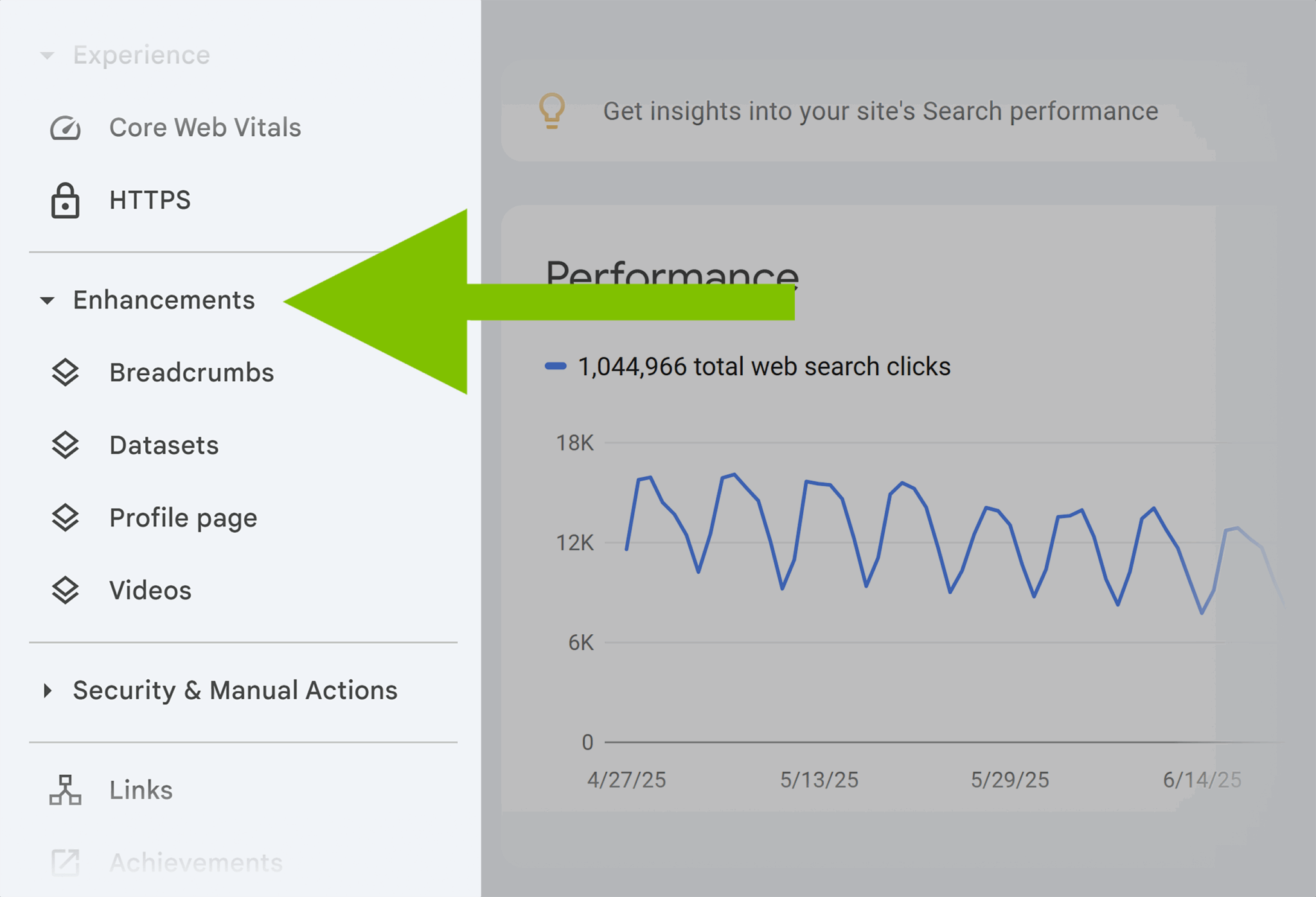
Pro tip: Find out if your structured data is working correctly and see how many impressions they’ve earned in Google Search Console under the “Enhancements” menu:
Why is my website visibility dropping?
Sudden drops in organic search visibility can be alarming. It’s never fun to watch your metrics decline!
Let’s take a look at some of the most common reasons why your site’s organic search visibility may have dropped.
Algorithm updates
You’ve likely heard about the big algorithm updates, but did you know that Google is constantly updating their algorithm?
It’s true. Not all updates are big enough to get named; however, that doesn’t mean they’re not big enough to affect your rankings!

To see if a recent core update could have affected your rankings, visit Google’s Search Status Dashboard.
Technical SEO Issues
Sometimes, technical issues with your website can make it difficult to rank in search results.
For example, here are a few of the technical issues your site could be experiencing:
- Crawlers blocked by robots.txt
- Orphaned pages with no internal links leading to them
- Thin, duplicate, or poor content
- Slow load times
- Mobile rendering issues
- Invalid structured data and schema
To make sure your technical SEO is dialed in, check out What is technical SEO? The definitive guide.
Content decay or cannibalization
When it comes to serving content to users, Google prefers newer content over outdated content. So, naturally, the algorithm prefers to rank and feature content that was published or updated at least within the last couple of years.
As content gets older and possibly becomes outdated, it’ll naturally lose organic search visibility. This is called “content decay.” That’s why it’s so important to identify and refresh decaying content to maintain your organic visibility.
Content cannibalization, on the other hand, happens when you have multiple pieces of content on your website that are too similar, leading them to compete against each other in the search results for the keywords and subjects they share.
That makes it much harder for either piece to gain organic search visibility, confuses search engines, and weakens overall SEO performance.
Further Reading: What is keyword cannibalization? (And how do I fix it?)
How to diagnose visibility problems
When your site’s visibility drops, diagnosing the problem is the first (and often the most difficult) step. The causes of organic search visibility drops aren’t always clear, but there are a few clues you can investigate.
Follow these steps to diagnose why your organic search visibility has decreased:
Pinpoint the timing of the drop
Take a look at when your visibility drop started. Was it a sudden drop or a gradual decline over several weeks?

Compare the timing of your drop with Google’s algorithm update history. If your drop coincides with a known core update, that’s likely the culprit. If not, that doesn’t totally rule out an algorithm adjustment, but keep looking at other factors.
Determine if the drop is sitewide or targeted: In your position-tracking tool (pictured below in Semrush), segment your keywords by categories or page types and look for patterns.
Did all content types lose visibility? Are certain topics or keyword groups more affected than others? Did some pages actually gain visibility while others dropped?
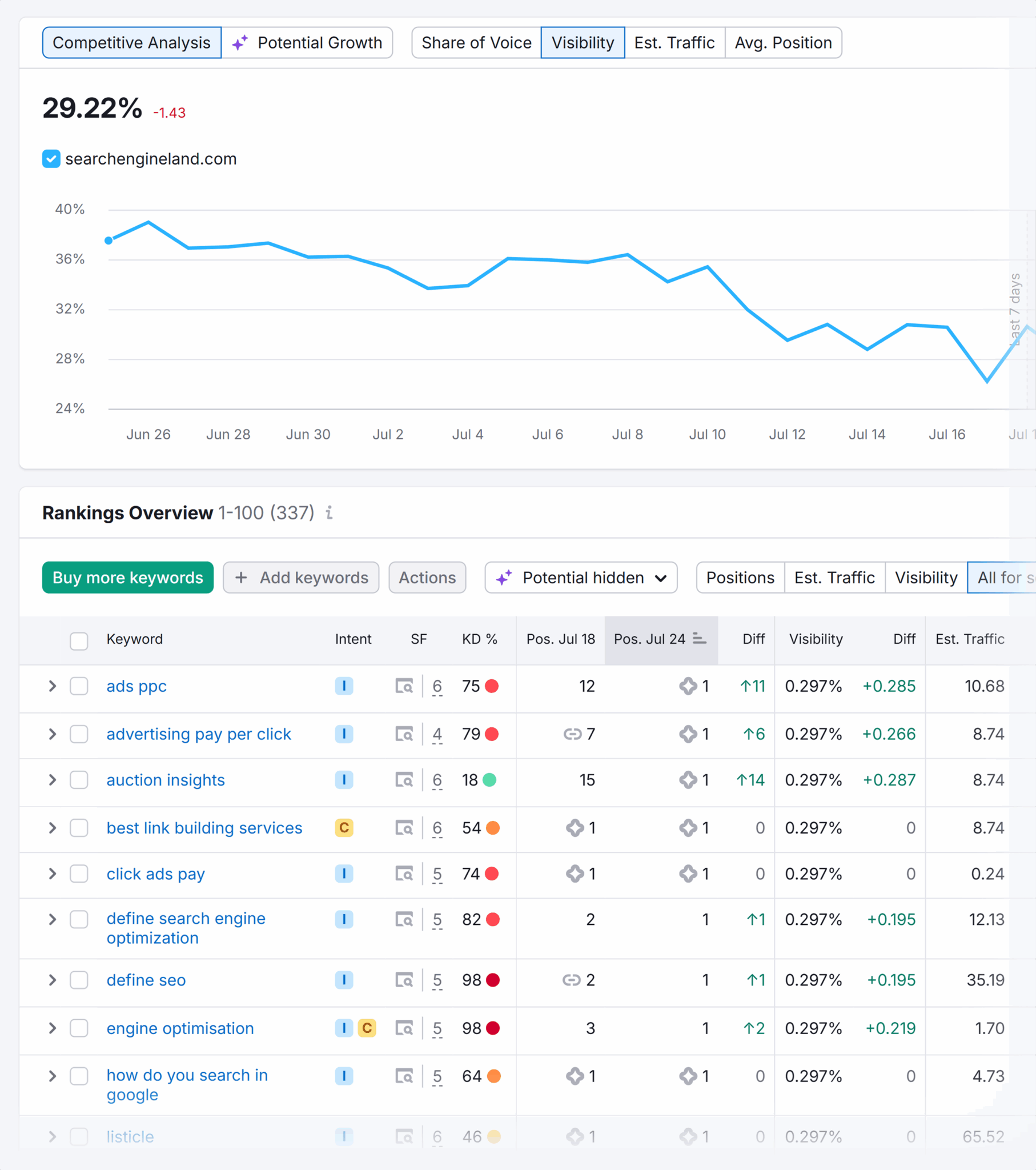
If the drop is across all your content, you’ve probably experienced a site-wide technical issue or algorithmic penalty. If it’s specific to certain topics or pages, the problem is probably content-related.
Analyze your Google Search Console data
Open your Google Search Console dashboard and check the Performance report. The drop there should roughly match what you’re seeing in your visibility report.
Also, click on “Pages” in the left sidebar to check your “Page indexing” report to make sure there aren’t new issues keeping your pages from being indexed correctly:

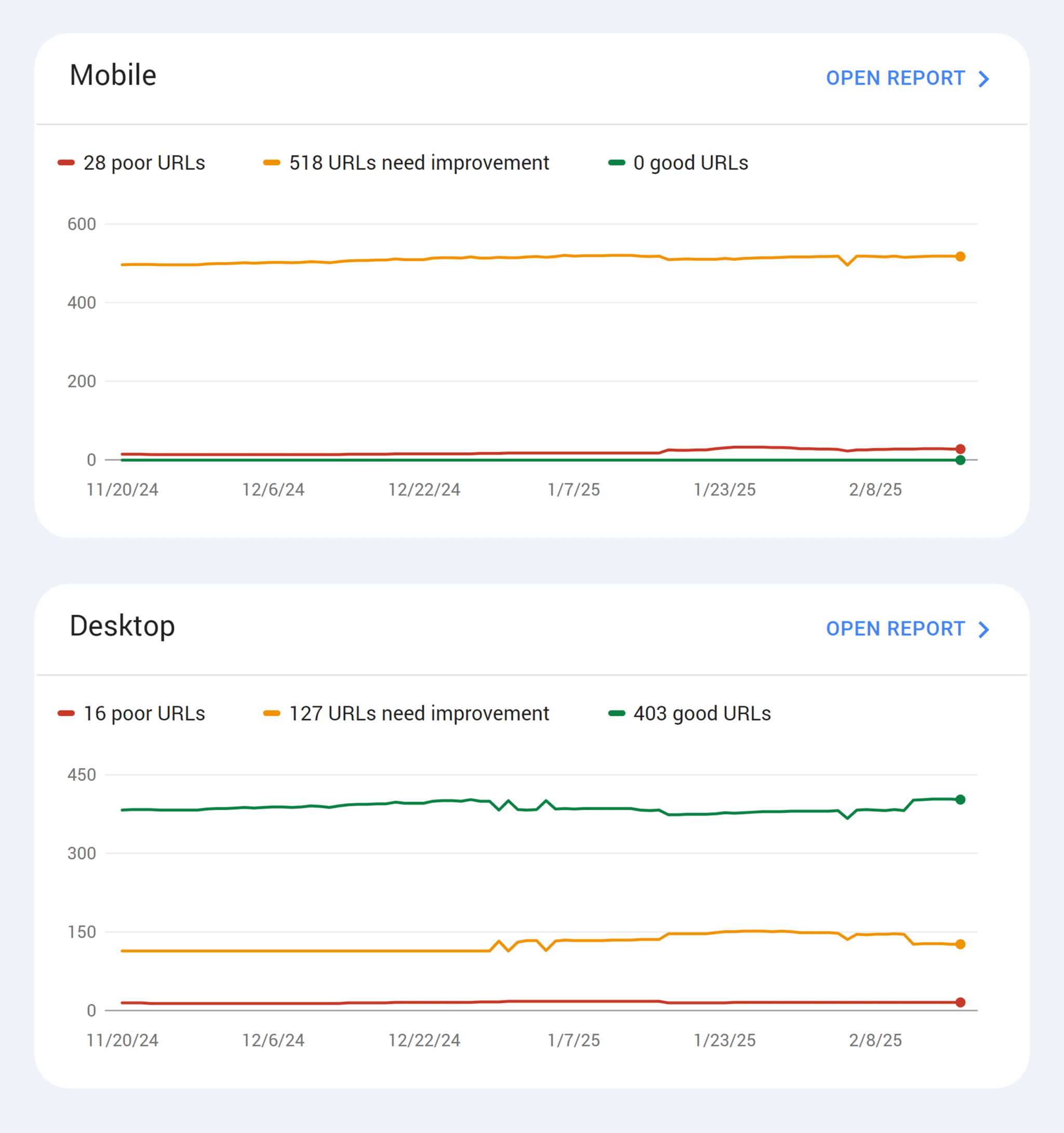
The “Core Web Vitals” report is a good report to check, too. Make sure you don’t have any sudden, major speed issues there:
Segment by page type
Are blog posts losing visibility while product pages stay stable? This can help you identify if the problem is content-related or technical, so can modify your SEO strategy backed by data.
Look at competitor performance
In general, if multiple competitors in your space also experienced drops, it’s almost certainly an algorithm update affecting your entire industry’s search engine rankings or search intent. If you’re the only one who dropped while your competitors gained visibility, look for site-specific issues.
If you use Semrush, you can scope out your competitors in a few different areas. Pictured here is the “Organic Research” report:

Further Reading: How to use advanced SEO competitor analysis to accelerate rankings & boost visibility
Analyze the affected pages
If your drop seems to be concentrated to specific pages or content types, dive deeper into those areas:
- Are the affected pages slower than your site average?
- Do they have technical issues like broken internal links?
- Has the content become outdated compared to what competitors are publishing?
- Are there cannibalization issues where multiple pages target similar keywords?
It’s possible that updating your content will fix the issue and cause your visibility to rebound over the following few weeks.
Measuring, tracking, and reporting on search visibility
Tracking your organic search visibility is only helpful if you can translate any wins into language that stakeholders actually care about. Here’s how to explain its value:
Translate visibility into ROI-friendly language
If you just show your stakeholders a graph showing that visibility is on the rise, it won’t communicate what search visibility is and why it really matters. Instead, connect visibility improvements directly to business outcomes that they’ll understand.
- Calculate the advertising equivalent value: When your visibility increases by 20%, estimate what it would cost to achieve that same exposure through paid search ads. “Our visibility improvements this quarter equal the equivalent of $5,000 in additional monthly ad spend.”
- Show market share growth: Frame organic visibility gains as capturing larger shares of your search market. “We’ve increased our share of voice in the project management software space from 12% to 18%, meaning we’re now visible for nearly one in five relevant searches.”
- Connect to pipeline metrics: Track how visibility improvements in specific topic areas correlate with lead generation. “Our 25% visibility increase for ‘marketing automation’ topics has driven a 30% increase in demo requests from organic search.”
Build visual reports that show off wins
Reporting on keyword rankings is not as helpful as it used to be. Instead, create visual dashboards that tell the complete story of your organic search presence.

Try adding:
- Visibility trend charts: Show month-over-month visibility growth across different business units or topic areas. Include annotations for major content launches or technical improvements that drove growth.
- SERP feature coverage: Display how your presence has grown across different types of search results over time. Show increases in AI Overview citations, video results, image results, People Also Ask, and more.
- Traffic correlation analysis: Show how visibility improvements translate to actual traffic and conversion increases and bounce rate decreases. Connect the dots between visibility gains and business results.
Tie visibility to revenue
In the end, stakeholders want to know how your work is driving revenue. To do that, you need to connect your organic visibility wins directly to pages and topics that drive business results.
Here are a few ways to make that happen:
- Add revenue-weighted visibility: Track visibility improvements for keywords and topics that historically drive the highest-value traffic. Show how visibility gains in these areas have a bigger business impact.
- Track conversion funnel visibility: Monitor visibility across different stages of the customer journey (you can do this by using categories or tags in your position tracking tool). “Our visibility for bottom-funnel keywords increased 45%, driving a 30% increase in organic conversions.”
- Track the customer acquisition cost impact: Calculate how visibility improvements reduce your overall customer acquisition costs by driving more organic traffic to high-converting pages.
Pro tip: You might have to change your marketing attribution model in order to figure out just how much revenue your organic search visibility is driving.
Navigating visibility in zero-click searches
The rise of zero-click searches is fundamentally changing how we approach organic search visibility, content strategy, and SEO. Understanding this shift is crucial for anyone working to increase search visibility and organic traffic.
What are zero-click searches and why are they rising?
Zero-click searches happen when users get the information they need directly from the search results page without clicking through to any website. This occurs through SERP features like AI Overviews, featured snippets, knowledge panels, People Also Ask, and more.
In 2024, a study by SparkToro found that nearly 60% of Google searches in the US ended in either nothing or another search (i.e.”zero-click”).
This trend is accelerating as AI Overviews expand to more queries and Google continues enhancing its direct answer capabilities.
The rise of zero-click searches reflects Google’s goal of providing immediate value to users, even if it means fewer clicks to websites.
Because of this, many website owners have watched an increasingly large disconnect developing between impressions and click-throughs. They’re getting higher visibility from being mentioned in AI Overviews, but less click-throughs because the searcher’s query is being answered in search results.
So what does that mean for the way we measure organic metrics?
Measuring success in a zero-click environment
Thanks to zero-click searches, visibility improvements might not correlate with traffic increases the way they used to, making it harder to demonstrate ROI using traditional metrics.
Traditional visibility measurements often focus heavily on clicks, which can paint an incomplete picture in a zero-click world.
So, you need to expand your success metrics beyond clicks to capture the full value of zero-click visibility.
To do that, try:
- Tracking brand awareness metrics: Track branded search volume, direct traffic increases, and brand mention frequency to measure the impact of zero-click exposure.
- Tracking share of voice in AI features: Monitor how often your content appears in AI Overviews, video carousels, and other zero-click features compared to your competitors.
- Watching long-term traffic patterns: Look for delayed traffic increases and branded searches that might result from zero-click brand exposure rather than immediate click-throughs.
- Switching conversion attribution modeling: Use longer attribution windows to capture conversions that might start with zero-click brand exposure but convert through other channels later.
The key is recognizing that zero-click visibility can be valuable brand-building exposure that pays dividends through increased recognition, trust, and eventual direct engagement with your brand.
Which means it’s time to work on…
Track, optimize, and win in Google and AI search from one platform.
Optimizing for brand exposure without clicks
Since zero-click searches aren’t going away, you need strategies that provide you with value even when users don’t visit your site.
A few of those strategies are:
- Create citation-worthy content: Develop authoritative, well-researched content that AI search is more likely to reference. Focus on being the definitive source for specific topics in your industry.
- Brand mention optimization: Include your brand name naturally within content that’s likely to be featured in AI Overviews or snippets (but be careful not to overdo it). This helps build brand recognition even when users don’t click through. “At [your company], we’ve figured out that the best content optimization strategy is…”
- Answer-first content strategy: Structure content to provide immediate value even when extracted for SERP features. Write clear, concise answers that work well as standalone snippets while encouraging a click for more information.
- Build topical authority systematically: Create comprehensive content hubs that establish your brand as the go-to source for entire topic areas. This increases your chances of being referenced across multiple related searches.
- Leverage zero-click for funnel building: Use zero-click visibility to build brand awareness that drives direct traffic, branded searches, and referrals over time. Think of it as top-of-funnel marketing rather than a direct conversion driver.
Further Reading: Why PR is becoming more essential for AI search visibility
The plan: Build long-term visibility for your brand
Organic search visibility is no longer simply a measure of keyword rankings. Instead, it means building a sustainable presence in search results regardless of whether the query drives an organic click or not.
If you can marry your topic coverage strategy with technical website optimization and a zero-click marketing plan, you can build a future-proof organic strategy that’ll grow and adapt along with the search landscape.
Interested in more insights about just how AI Overviews are impacting search traffic across the web? Check out this Semrush study: We Studied the Impact of AI Search on SEO Traffic. Here’s What We Learned.
Explore more on
Editorial disclosure
Search Engine Land is owned by Semrush. We remain committed to providing high-quality coverage of marketing topics. Unless otherwise noted, this page’s content was written by either an employee or a paid contractor of Semrush Inc.
About the author