Google penalties: Advanced detection, recovery, and prevention strategies

Not all Google penalties are obvious.
You might lose search traffic overnight and have no idea why—no alerts, no errors, just disappearing rankings.
In many cases, it’s a hidden algorithmic filter or a manual action quietly dragging your visibility down.
One study found that websites impacted by algorithm updates can take 3–6 months or longer to recover, if they recover at all.
This guide will show you how to spot penalties (even the stealthy ones), how to recover from them, and how to protect your site moving forward. Whether you’re dealing with thin content, toxic links, or something else entirely, you’ll find the workflows and tools to fix the issue quickly.
What are Google penalties?
A Google penalty is an enforcement action that reduces a site’s visibility in search results. In some cases, the site may be deindexed entirely.
The most recognizable penalties are manual actions, triggered when a human reviewer manually flags a violation of Google’s Search Essentials. These typically relate to spam, manipulation, or other attempts to deceive the algorithm.
But not all penalties come from manual review. Many SEOs now consider Google’s automated actions (or algorithmic demotions) as penalties, even if they aren’t labeled that way. Understanding the difference between manual and algorithmic impact is key, and we’ll cover that shortly.
So what triggers a penalty? Most often, it’s an attempt to manipulate rankings using spammy tactics.
Types of manual action
What types of Google penalties are there? Google has a list of manual actions, but it’s pretty complex.
Let’s break it down using simpler language.
- Third-party or user-generated spam: The site has content that doesn’t add value and detracts from its purpose. For example, comments on blog posts that have nothing to do with the blog are trying to get people to click on a link.
- Spammy-free host: Your site is hosted on a free web host that also supports spammy or low-quality sites. The reputation of the entire hosting environment can trigger penalties.
- Structured data issue: This usually means there’s a problem with your schema markup—like telling Google there’s something on the page (such as a job listing) that isn’t there.
- Unnatural links to your site: These are backlinks from other websites. While backlinks are important for SEO, links from low-quality or irrelevant sites can raise red flags and lead to penalties.
- Unnatural links from your site: These are outbound links pointing to other websites. Practices like link exchanges—trading links for SEO benefit—are against Google’s guidelines and can result in penalties.
- Thin content: This isn’t about word count. Google is looking for content that delivers users original insight or real value.
- Cloaking: This is when a website shows one version of a page to search engines and a different one to users. For instance, a site might pretend to be about shoes for SEO, but actually serves unrelated or misleading content to visitors.
- Sneaky redirects: Similar to cloaking, this tactic tricks users. A visitor might land on a page that appears relevant (like shoes) but is immediately redirected to unrelated or deceptive content.
- Keyword stuffing: This involves overloading a page with keywords in an attempt to boost rankings, which can result in a penalty instead.
- AMP mismatch: Accelerated Mobile Pages (AMP) are stripped-down versions of pages meant to load faster on mobile. If the AMP version differs significantly from the regular version, it can trigger a penalty.
- News and Discover policy violations: These apply to publishers using Google News or Discover. Violations include spreading misinformation, impersonating others, or publishing hateful or harmful content. Even a few violations can lead to significant visibility loss in these channels.
- Site reputation abuse: This happens when someone publishes content on a high-authority site to exploit its ranking power, especially if the content is irrelevant or low-quality.
Google also lists “Major Spam Problems,” which means the site is doing one or all of the above in a big way.
The SEO toolkit you know, plus the AI visibility data you need.

Manual vs. algorithmic penalties: How to tell the difference
Not sure which one you’re dealing with? Use this breakdown to compare.
Not all ranking drops mean you’ve been penalized. Some result from technical errors, like deindexing a page, site downtime, or overwriting previous SEO changes. These aren’t penalties. They’re self-inflicted issues.
But when rankings drop without an obvious technical cause, it often comes down to either a manual action or an algorithmic penalty.
Here’s how to tell the difference:
Manual penalties
- Applied by a human reviewer at Google
- Usually related to spam, manipulative links, or violations of Google’s Search Essentials
- Appear in Google Search Console under Manual Actions
- Often trigger a notification email
Algorithmic penalties
- Triggered automatically by Google’s ranking systems
- Often tied to content quality, link profiles, or user experience
- Do not appear in Search Console
- May align with known Google algorithm updates
Both can significantly impact your traffic and rankings. The main difference is visibility. Manual penalties show up in Search Console, while algorithmic issues need to be diagnosed by tracking traffic, rankings, and recent updates.
Algorithmic penalties and site devaluations
There’s an ongoing debate in the SEO world about whether algorithmic changes count as “penalties.” While they aren’t manual actions, they can suppress rankings and reduce visibility just as much.
One example is sandboxing, a temporary filter that often applies to new websites. Even when content is strong, these sites may rank poorly until Google gathers more trust signals. This was confirmed in a 2024 leak of Google’s internal documentation.
Google’s algorithms can impact a site in a number of ways. These include:
- Suppression: Temporary ranking drop based on perceived content quality or relevance.
- Demotion: More lasting deprioritization across broader sections of the site.
- Devaluation: Specific content or links are ignored or assigned less weight.
These effects don’t appear in Search Console, but they still lead to traffic and ranking losses. For site owners, the result often feels like a penalty.
Google’s goal is to elevate helpful content. That means anything that appears unhelpful—thin, repetitive, or misaligned with search intent—can be pushed down. Helpful Content updates and AI-assisted ranking systems increasingly enforce this across topics and page types.
Some of these effects date back to earlier updates like Google Panda (content quality) and Google Penguin (link spam). The principles behind them still apply.
The impact of a penalty
A penalty can reduce your visibility in search results or even lead to deindexing, i.e., removal from the search results. That drop in visibility directly affects your organic traffic, and by extension, your leads, sales, and revenue.
The impact on search-dependent businesses can be severe, resulting in major traffic, revenue, and staffing losses.
In 2024, HouseFresh.com was hit hard by a Google algorithm update and had to lay off a good chunk of its staff, as reported by the BBC. And that’s just one story out of many.
The impact depends on the severity of the issue. Some penalties affect only a handful of pages, while others can suppress an entire site until the underlying issues are resolved.
How to diagnose a Google penalty with or without Search Console alerts
So, you’ve seen your SEO traffic drop, and you’re wondering if you’ve been hit with a penalty. Google penalty diagnosis starts with Google Search Console (GSC), but other tools can be useful too.
Check for manual actions
How to detect a Google penalty. Number one: Check your emails from GSC. When a manual penalty is applied to a website, Google always sends a notification email, assuming you have GSC set up.
You can also examine the GSC account itself. Select your domain from the dropdown, navigate to the “Security” and “Manual Actions” sections, and click on “Manual Actions.”

If everything is OK, you’ll see No issues detected:

If not, you’ll see specific issues flagged. Expanding the issue will also show whether the whole site is affected or just specific parts.
Of course, you may not see anything here if your site is performing poorly due to something algorithmic.
Analyze traffic drop patterns
You won’t always get a manual action.
These are the best ways to detect signs of algorithmic penalties or suppressions.
Organic segmentation in Google Analytics
Segmenting your Google Analytics data to look only at organic traffic (or even purely Google organic) is another way to assess the situation.
Here’s how you do that.
Go to Google Analytics, select the correct property for your site, and you should see the option to create a “Comparison” at the top. (If you don’t see this, try going to the “Reports Snapshot” or “Life Cycle” > “Acquisition” > “Overview”).

The default option in the list is “Organic Traffic.” Select it, turn off “All Users,” and hit “Apply” at the top right.

Alternatively, you can create a new Comparison by hitting the “+ Comparison” button. You’ll need to use “Session source/medium” as the dimension, “exactly matches” as the match type, and “google / organic” as the value.

Click “Save” to reuse later, or “Apply” to move forward. You may need to reapply the segment as you navigate between reports.

So, what should you look at? Well, firstly, go to “Life Cycle” > “Acquisition” > “Overview,” set a date range with the period you think you were hit with a penalty somewhere in the middle, and see if you can see a corresponding drop in traffic.

Next, it can be useful to set a date range so you have the period after the drop compared to a period of the same length before the drop.
That might be using the “Preceding period” option, or you might want to leave a gap between the two periods if there’s a transitional period where you’re unsure which side it should go on.

Alternatively, compare to the previous year if seasonality is a big deal for you.
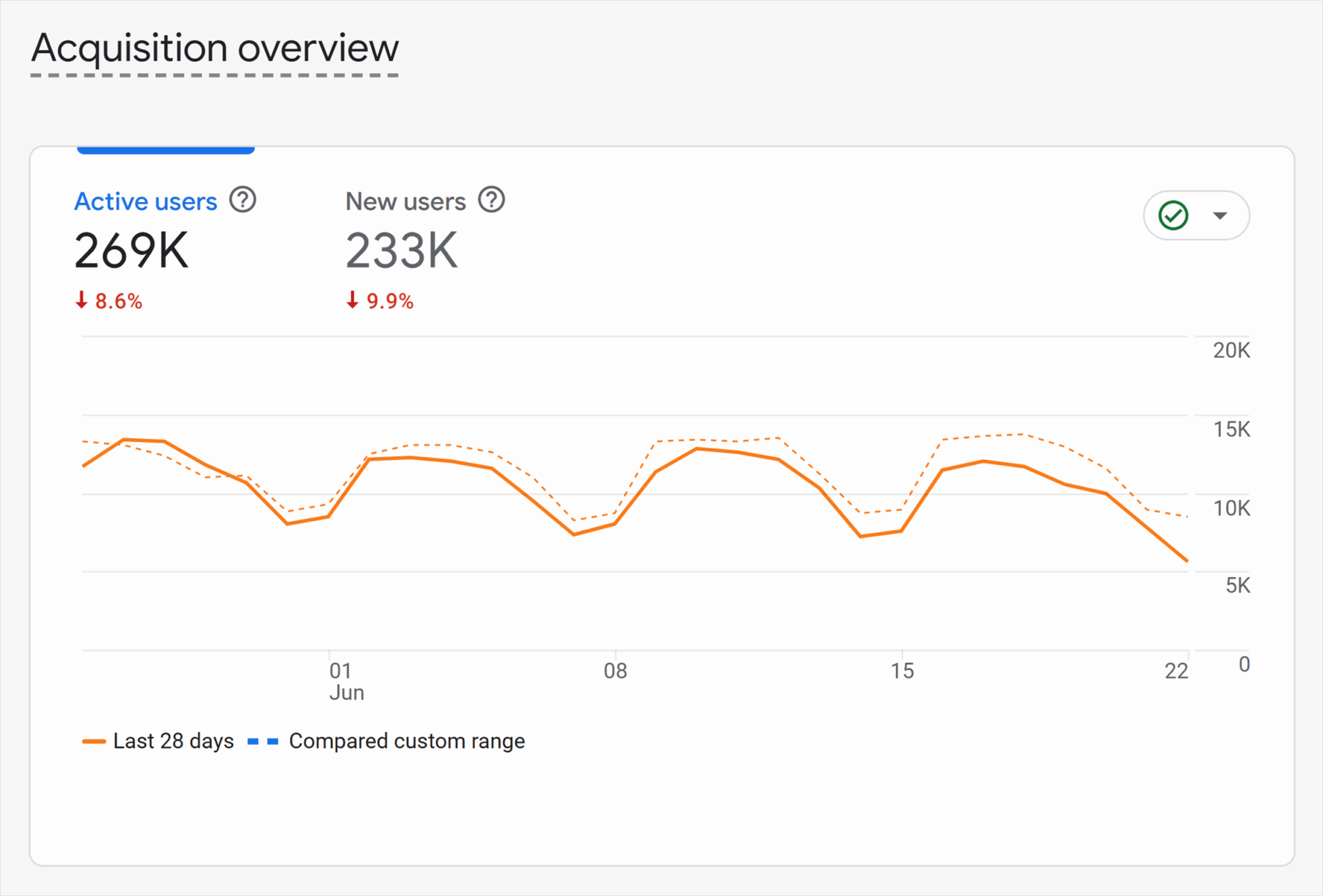
With this setup, you can tell how much traffic fell and get a feel for how things changed before and after.
What pages are affected?
Now you have a segment and date range in place, you can start to dig a little deeper.
Go to “Lifecycle” > “Engagement” > “Pages and Screens” (remembering to check the “Organic” segment is still applied). Look for the pages with the largest negative change in views.
Do they have anything in common?
Are they across the whole site, or is there a specific keyword theme?
You can also put words that represent URL directories in the “Search” box at the top of the table. An example: if your blog posts all have /blog/ in the URL, you can see if the impact was mostly on the blog or on the rest of the site.
In this case, views of blog pages went up, so we can surmise that blog posts weren’t the cause of the penalty.
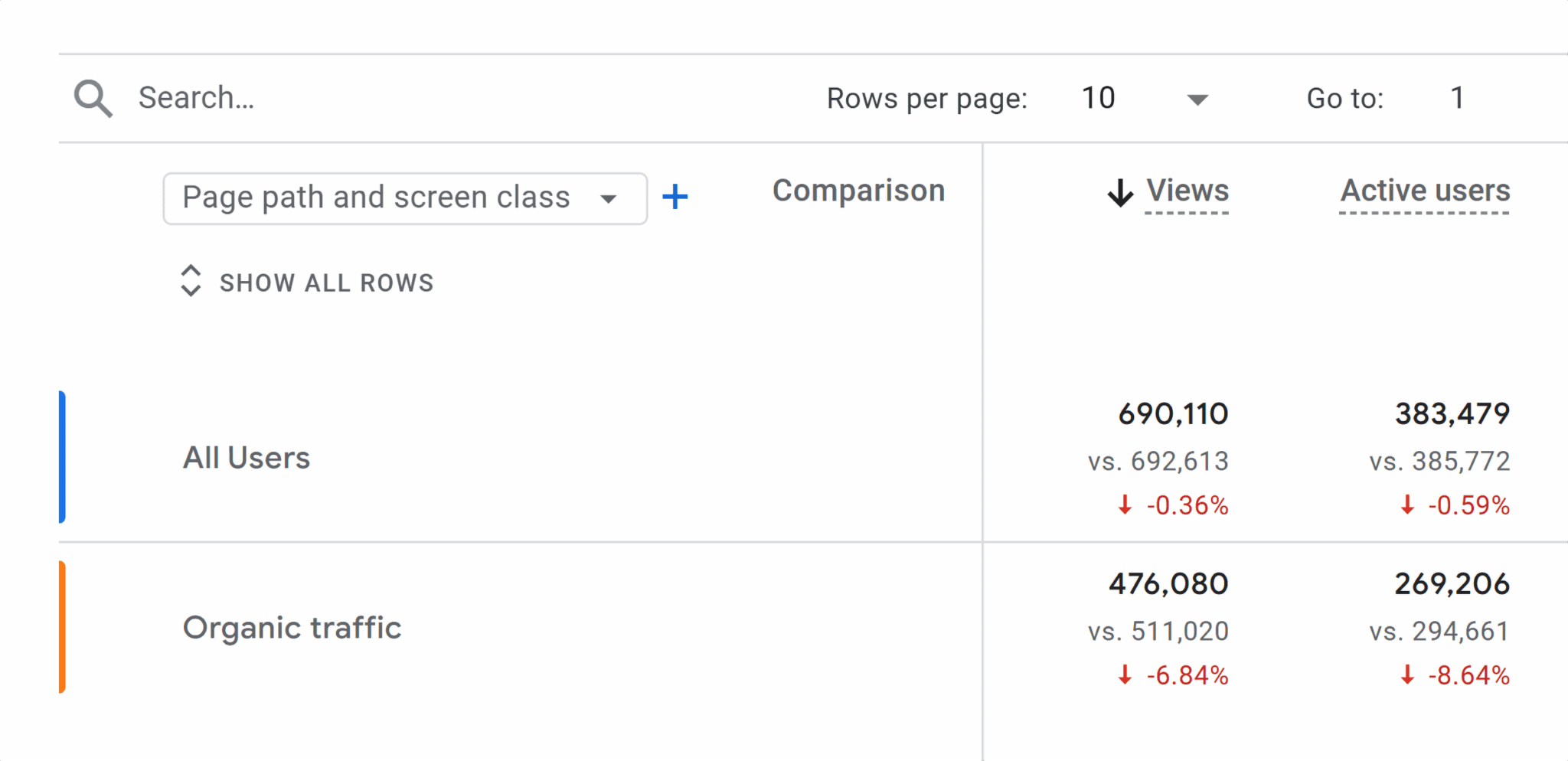
Use the search bar to filter by other URL segments, such as /product/ or /category/, to isolate which parts of the site were most affected.
This also gives us some information about the intent of the affected searches. Blog pages are often more informational, while category, product, and service pages tend to be more transactional.
Device and location
If the drop is isolated to a device, country, or channel, the issue may be technical or regional, but keep in mind that some algorithm updates, like the helpful content update, can have uneven effects based on device usage, search intent, or user signals.
Is it only organic?
Google Penalties only directly affect organic traffic.
It can be useful to check if other channels are affected too, either by adding more comparisons or looking at “Lifecycle” > “Acquisition” > “Traffic Acquisition.”

When organic traffic falls significantly, you might see a knock-on effect on direct traffic and other sources, but if it’s a penalty, you’d expect the biggest and most noticeable impact to be organic search.
Analyze crawl activity
Check the “Crawl Stats” report in Google Search Console (under Settings). A sudden drop in crawl frequency might indicate reduced trust, but could also be due to technical changes or altered internal linking.
Server log analysis can also indicate how often Googlebot is visiting your site.
GSC performance data
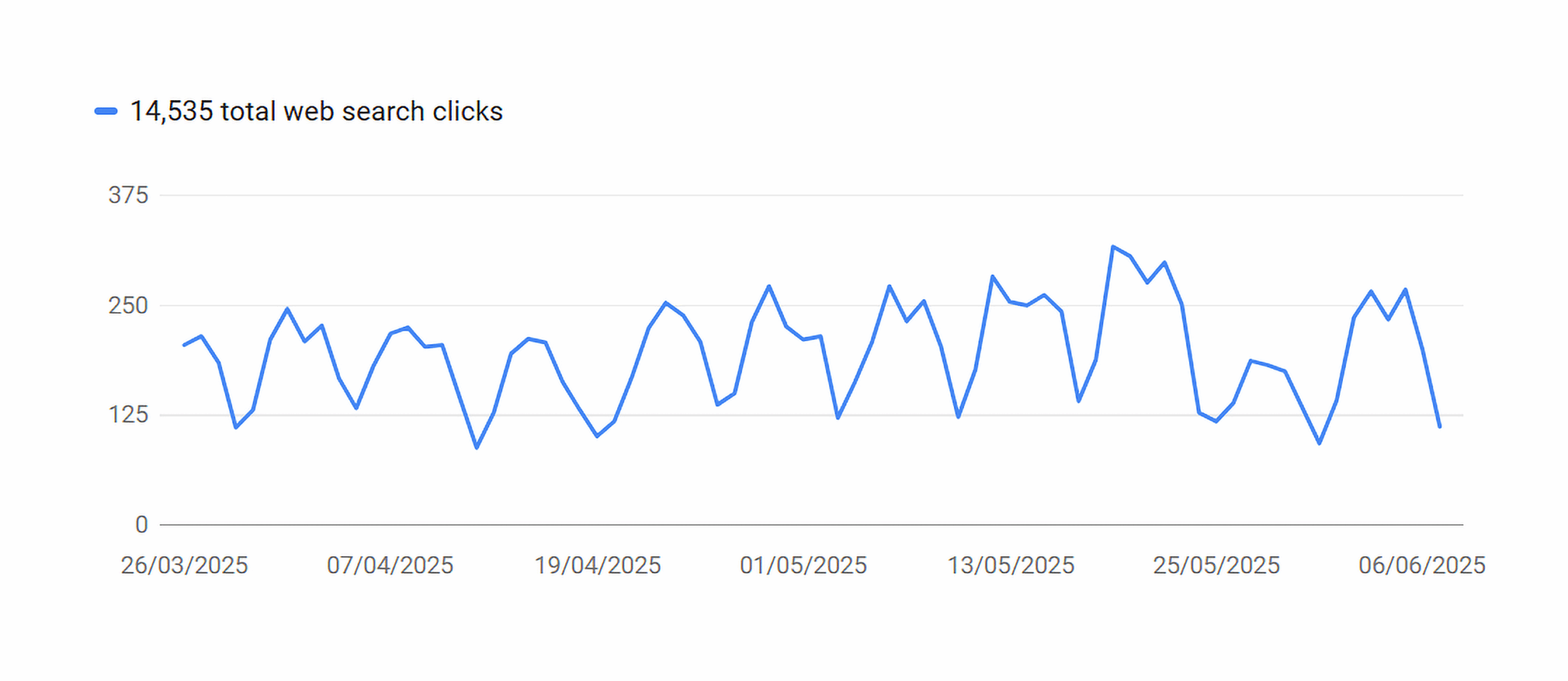
If your organic impressions (views) and clicks suddenly drop, that’s another possible indication of a penalty.
Google Search Console is also helpful here. Go to the “Performance” page.
Turn on “Average Position” in the graph to see how your rankings have shifted over time. This indicates how high up in the search results your site appears on average, with 1-10 being page one, 11-20 being page two, and so on.

If there is a drop, you can then start to filter the “Queries” in the chart further down the page. Filter queries by your brand name. Then compare branded vs. unbranded performance—do they show the same trend?

You can also try to understand whether the queries are transactional or informational.
Similarly, go to the “Page” tab. Have all pages been impacted, or just some?

This helps identify whether the impact is sitewide or limited to specific content types or topics.
Track keyword ranking and SERP changes
If you’re using a keyword position or rank tracking tool, that will provide valuable data as to what’s happened.
Using Semrush as an example, go to “SEO,” then click “Position Tracking” under “Keyword Research.”

Select the appropriate project.
On the “Overview” tab, you can either look at average ranking positions over time for your chosen keywords, or visibility. Given that visibility is a measure of how often your site could be seen in the search results, that’s an important metric.
Look for sudden drops. Some tools also have major Google algorithm updates marked for ease of reference.

A drop in visibility that aligns with a known Google update may suggest an algorithmic impact.
Similar to the GSC Performance data, it can also be useful to look at the rankings for individual keywords and pages. Have rankings fallen for the site as a whole, or particular keyword themes?
Sort your keywords or pages by largest drop in ranking or visibility to see what’s most affected.

SERP features
Many rank tracking tools show which SERP features your site appears in, like AI Overviews, sitelinks, or the map pack. Losing these features may also signal a penalty or devaluation.
This can include AI overview results, inclusion in the map pack, display of extra site links, and so on.
Alongside falling overall rankings and visibility, losing these features, or having fewer of them, could also indicate a penalty.
How to validate penalty causes without guessing
Be cautious about settling on a cause too quickly. Drops that align with algorithm updates may be coincidental.
Compare changes across branded vs. unbranded queries, transactional vs. informational intent, page types before drawing conclusions.
Identifying the root cause: Google penalty analysis workflow
So, you’re pretty sure you’ve been hit by a penalty. You’ve either gotten a notification from Google Search Console about a manual action, or you think there’s something algorithmic going on.
Your earlier analysis may have narrowed it down to specific pages, keyword themes, or sections of your site. But you’ll need to do a bit more work to figure out the actual cause and have a chance to fix it. You’ll need a forensic SEO audit to pinpoint the root cause at this stage.
Note: Sometimes, you won’t have a definitive answer. It can be a process of elimination and educated guesses.
Log file audits and crawl budget reallocation
Website log files can help identify crawl pattern shifts that can signal devaluation or deprioritization of content.
So, what is a log file?
A log file is a record of visits to your website by your server. The data your server keeps is usually in a raw format that’s difficult to interpret manually. However, you can use log file analyzer tools to make the analysis process much simpler and more visual.

What to look for
If you suspect a penalty, reviewing Googlebot’s crawl behavior before and after the drop can provide helpful clues, especially if you’re working with server logs or crawl tools.
Start by comparing two time frames:
- Before the penalty or drop
- After the penalty took effect
Look for patterns like:
- Sections of the site that used to receive frequent crawls but now get less attention
- Sudden drops in crawl frequency to key pages (could indicate deprioritization)
- Googlebot spending excessive time on low-value URLs (e.g., filtered product pages, session ID URLs, calendar links)
These insights can reveal two things:
- Where Googlebot’s interest has shifted, potentially due to perceived quality issues
- Where crawl budget may be wasted on pages that don’t need to be indexed
If you notice crawl traps or index bloat (hundreds of thin or duplicative pages being crawled), it’s worth addressing. But remember: crawl behavior alone doesn’t cause penalties—it reflects how Google prioritizes your site based on perceived quality.
Top tip: If Googlebot is spending time on low-value URLs—like login pages, session-based links, or faceted navigation—you can block them in your robots.txt file. This helps prevent crawl waste and keeps Google focused on your priority pages.
Keep in mind: Disallowing a page stops it from being crawled, but not necessarily indexed. To prevent both, use noindex meta tags (on crawlable pages) or consider canonicalization or parameter handling in GSC.
Content quality vs. over-optimization
The next step is analyzing your content. Start with your most-affected pages or sections. Or if you aren’t sure what’s affected, focus on the pages that used to have the most organic traffic–probably your homepage and/or top level category or service pages.
Google provides a list of questions to ask yourself about the content.
The emphasis is on helpful content that provides real value to your audience. If you’ve been hit by a penalty, over-optimization may be the cause, such as keyword stuffing or publishing AI-generated content without value.
What quality content looks like
Here’s an example of poor SEO copy:
This designer lamp is elegant and stylish and would suit any home. As designer lamps go, it’s a great example. Buy your designer lamp today!
Keywords are there, but the copy tells the user nothing useful. The sole purpose of those sentences is to get the keywords in. That’s the wrong approach.
If you’re buying a lamp, you probably want to know things like:
- What color is it?
- What’s it made from?
- How big?
- Would it really suit “any home” or is there a particular style it would work well with?
- What kind of bulbs does it take?
- Is there a warranty or guarantee?
Focus on the information your users need. Keywords should be there, sure, but not stuffed in unnaturally.
Content pruning vs. enhancement: Which signals cause reversals
If you’ve recently pruned content from your site, it’s possible that’s the penalty’s root cause. Removing thin, low-quality content that isn’t performing can be a way to improve your overall SEO results. But it has to be done right.
A recent post from Contentoo on LinkedIn showed how they cut their blog posts by 50% and improved keyword positions by an average of around 10 at the same time.

But deciding what to remove, improve, or merge isn’t always easy. CNET were criticized in 2023 after they removed thousands of old news posts, for example.
Pruning the wrong things
While pruning low-quality, low-traffic content can be positive, it’s important to avoid removing:
- High-quality posts (even if their traffic is low)
- Old content that’s otherwise of a high quality
- Post with significant backlinks
- Posts that provide value for users
Redirecting posts you’ve removed can also be important.
Updating existing content is low-risk and often effective, especially if you’re adding depth, improving structure, or aligning it with current search intent. The only real negative consequence of improving an old page would be if it competed with another for the same topic and keywords, in which case merging the content onto a single page would be the better plan.
Toxic backlinks
Signals focused on spammy backlinks have existed since Google’s Penguin update in 2012. Today, Google’s systems tend to ignore spammy links rather than actively penalize you for them, unless your overall backlink profile looks unnatural.
However, you risk algorithmic problems or a manual penalty if the backlink profile looks unnatural.
So, what is an unnatural backlink profile?
There are a number of factors, but the main ones are:
- Large numbers of links from low-quality and/or irrelevant domains.
- Overuse of exact-match anchor text. Using the same keyword repeatedly as link text can raise flags, especially if it looks manipulative.
- High velocity of toxic links–A sudden spike in low-quality backlinks can look suspicious to Google’s algorithms.
Spammy links often come from scraped, spun content farms or blog comment spam.
Backlink decay and negative velocity
It’s not just toxic backlinks you need to worry about. Links naturally decay over time. Pages get deleted, links break, and the authority of linking domains can drop.
If link loss (decay) outpaces new acquisitions, it can signal declining authority. A 2024 study showed that about two-thirds of links disappear within nine years, and that number rises to 75% when you factor in temporary errors and discovery issues.
Losing more links than you’re gaining—known as negative link velocity—can raise red flags for Google’s algorithms. It likely won’t trigger a manual penalty, but it’s still a negative signal.
Entity drift, topical dilution, and more
Emerging penalty signals are increasingly tied to low-quality or AI-generated content. While information is still limited, Manish Singh, Team Lead at digital agency Immwit, outlines a few patterns that can hurt content quality and possibly trigger algorithmic devaluation:
- Entity drift: The content begins on one topic but veers off into unrelated territory.
- Topical dilution: Long content with lots of filler but little real substance—what we used to call “fluff.”
- Needless repetition: Repetitive phrasing or keyword use that can resemble spam.
- Search intent mismatch: Content that seems relevant to a user query initially but doesn’t deliver what the user needs.
It is unclear whether these issues directly trigger penalties, but they undermine quality, and that’s enough reason to address them.
Google penalty recovery strategies that actually work
To recover from a Google penalty, fix the root issue, whether that’s thin content, toxic links, or lack of trust signals.
If the penalty aligns with a known algorithm update, research what that update targeted. If there’s no clear answer, improving site-wide content and authority is your best bet.
Remove vs. improve content
If thin or AI-generated content is the issue, evaluate what’s worth saving. Ask:
- Could this content be valuable if rewritten?
- Would it serve your audience?
- Could it attract meaningful traffic?
If not, remove it. If yes, and you have the resources, consider improving it instead. Rewriting low-quality AI content can pay off, but be realistic about time.
Not sure if the content was AI-generated? Use detection tools to help.
If a page clearly harms your site’s performance, removing it is not a bad idea. You can always create a better version later.
Top tip: Use a 404 for irrelevant content, or a 301 redirect if there’s a better page. Redirects can preserve SEO equity and improve user experience.
Rebuild E-E-A-T and trust
Google rewards sites that demonstrate Experience, Expertise, Authoritativeness, and Trustworthiness (E-E-A-T).
Start with the basics:
- Include author bylines and bios
- Make your business and team information visible
- Back up claims with credible sources or firsthand experience
For more on E-E-A-T, see: Decoding Google’s E-E-A-T: A Comprehensive Guide to Quality Assessment Signals.
Improve structured data (schema markup)
Schema markup helps Google understand what your content is and who it’s for. Your dev team can add structured data to pages to signal things like:
- Product details
- Author credentials
- Organization information
- Reviews and ratings
This reinforces trust and helps Google present your content more accurately in search results.
Strengthen internal linking and topical clustering
Linking related content into clusters can improve topical authority and help Google understand your content structure.
The pages you consider most important—like your homepage, key category pages, or cornerstone blog posts—should have the most internal links pointing to them. This often happens naturally through your site’s header, footer, or main navigation. However, contextual links in body copy and calls to action also carry significant weight.
Use internal links to:
- Direct traffic to high-value or high-converting pages
- Create topical clusters (e.g., one parent page that links to a set of related subpages)
- Help Google understand how your content connects
Topical clusters also support E-E-A-T by signaling depth of expertise on a subject. For example, a nonprofit like WWF might have a main “Adopt an Animal” page with individual pages for each species.

That said, internal linking can backfire when:
- You overload a page with too many internal links
- Your anchor text is repetitive or keyword-stuffed
- You link to unrelated or low-value pages
Tip: Make internal linking intentional. Group related content into logical themes, and avoid excessive or irrelevant linking.
Link penalties and disavow usage in the modern SEO landscape
If you’ve received an unnatural links manual action from Google for unnatural links, your top priority is backlink cleanup. It’s the only way to recover.

But even without a manual penalty, keeping a clean backlink profile matters. Toxic or spammy backlinks, especially in high volume, can raise algorithmic red flags.
How link penalty rules have changed since Penguin
Google’s 2012 Penguin update changed the game. Back then, sites were actively penalized for spammy backlinks. Today, the algorithm mostly devalues low-quality links, meaning they’re ignored rather than punished.
Still, you could face a manual penalty if your backlink profile looks engineered to manipulate rankings (e.g., too many exact-match anchors or irrelevant domains). That’s why regular link audits are still critical.
Tip: Use the disavow tool only if you’ve received a manual action or are certain one is imminent. Otherwise, Google is likely already discounting those links.
To disavow or not to disavow?
In 2012, Google also released its disavow tool. This tool basically allows you to tell Google, ” Please ignore these links.”
There’s an ongoing debate about whether disavowing links is still useful. In 2024, Google’s John Mueller said:
If you have a manual action for link-spam, or if you’re certain you’ll get one when someone looks, disavowing can make sense. Most spammy / paid / placed / swapped links are just ignored nowadays. It’s rare you’d need it.
So, should you disavow? If you’re confident that spammy links could lead to a manual penalty, yes. Just make sure you don’t disavow legitimate, high-authority links by mistake.
Backlink cleanup process
Start with a backlink audit. You can pull data from:
- Google Search Console: Go to “Links” > “Top Linking Sites” > “More” > “Export.”
- A backlink tool: Tools like Semrush or Ahrefs often include toxicity scores and filtering options.
Assessing backlink data
To get the data from GSC, go to “Links” on the left sidebar, then “More” under Top Linking Sites.
Then, hit the “Export” button at the top right.

If you’re using GSC, there will be more manual work involved. Many tools will give you a toxicity and authority scores for each site. With GSC, you’ll have to try to assess the quality of each site yourself.
Warning: Some of the links could be NSFW or hiding malware. Allowing a tool to assess the links and then sanity check those you’re not sure of if often safer. If nothing else, make sure your anti-virus and anti-malware software is up to date.
Then it’s a case of going through the data and flagging the linking domains you feel are spam, providing no value, and should be removed.
Some linking domains can be whitelisted straight away. You know a link from Amazon, from social media, or a high-profile news website is fine. Sometimes, it will be obvious that something’s spam from the domain name alone. But many will need a closer look.
Backlink removal
Theoretically, you should contact the webmaster of each site and send them a polite request to take the link down. In reality, this is very difficult.
On many sites, especially spammy ones, there are no contact details listed. You can try whois.com to find out who registered the domain, but even that may not always help. And even if you do find someone to email, those emails will mostly be ignored.
If you have a manual penalty showing in GSC, probably best to try anyway. Keep records of who you emailed and when, or why you weren’t able to.
If you don’t have a manual penalty, removal requests are probably unnecessary, except as a form of reputation management or if you want to be particularly thorough.
Disavowal
Once you have your list of toxic domains, you’ll need to format and submit your disavow file.
Reconsideration request timeline
Manual penalties require a reconsideration request. This tells Google you’ve addressed the issue, and a human reviewer will assess your work.
How long do reconsideration requests take?
Google says reviews can take “several days or weeks,” but link-related cases often take longer. Some stretch into months. Do everything thoroughly the first time to avoid a prolonged back-and-forth.
Best practices for reconsideration requests
A successful request includes:
- A clear explanation of the problem (e.g., link spam)
- Details about what you did to fix it (removal efforts, disavow file, content updates)
- Proof of action (screenshots, outreach logs, disavow file)
For example, in a link-related penalty:
- Explain who created the links and why it won’t happen again
- List spammy domains you identified and tried to remove
- Document your disavow submission
Top tip: Manual penalties = reconsideration request. Algorithmic penalties do not require one.
How to prevent future Google penalties
As we’ve seen, prevention is most definitely better than cure. So, how do you avoid SEO penalties?
Ongoing SEO maintenance and alignment with Google’s evolving standards are your best defenses.
Building resilient SEO systems
SEO is continuous, not one-and-done. Ask yourself:
- Are all content contributors trained in SEO best practices?
- Is there a defined QA or review process?
- Who owns the overall SEO strategy?
Assign ownership and invest in documentation and training. That alone can prevent future issues.
Track, optimize, and win in Google and AI search from one platform.
Content, backlink, and E-E-A-T audits
Set a recurring audit schedule for:
- Backlink health and toxicity
- Content quality and freshness
- E-E-A-T factors (e.g., byline credibility, originality, helpfulness)
Use a checklist to track progress and identify weak points before they hurt performance.
Avoid over-optimization
More SEO isn’t always better. Signs you may be overdoing it:
- Keyword stuffing or repetitive phrasing
- Excessive schema markup
- Internal links that feel forced or redundant
Tip: AI-generated content should be edited for clarity and originality. It’s a draft, not a publish-ready asset.
Strengthen trust signals: UX, branding, and topical authority
Trust extends beyond keywords. Google also considers:
- Page experience and design quality
- Bounce rate and dwell time
- Brand consistency across content
Topical authority isn’t built by one page. It’s earned by showing consistent expertise across a content cluster or site section.
Future-proof your SEO from penalties
Google penalties—manual or algorithmic—aren’t just traffic killers. They’re business risks.
If you want to stay protected, don’t wait for visibility to drop. Start with a proactive SEO health check:
- Audit your backlink profile for toxicity or unnatural patterns
- Review your top content for quality, search intent alignment, and E-E-A-T
- Check crawl stats and Search Console regularly for warning signs
Want to learn more about penalty-resistant SEO? Take a look at Decoding Google’s E-E-A-T: A Comprehensive Guide to Quality Assessment Signals.
Explore more on
Editorial disclosure
Search Engine Land is owned by Semrush. We remain committed to providing high-quality coverage of marketing topics. Unless otherwise noted, this page’s content was written by either an employee or a paid contractor of Semrush Inc.
About the author