What Is SEO – Search Engine Optimization?


What is SEO: The key takeaway
SEO (Search Engine Optimization) is the practice of optimizing websites and digital content to increase visibility, traffic, and brand authority across search engines and AI search. It includes technical optimization, content strategy, link building, and ensuring brands are accurately represented wherever people and AI find information.
Effective SEO requires understanding user search intent, targeting the right keywords, and ensuring a strong technical foundation. When done well, SEO drives targeted traffic, attracts potential customers, and strengthens brand awareness, ultimately supporting leads, sales, and revenue.
The SEO toolkit you know, plus the AI visibility data you need.

Getting started with SEO
If you’re just beginning your journey into SEO, this guide is for you. We cover everything, including: what SEO is, the different types of SEO (you can become an expert in any one of these), SEO specialties, a deep dive on how search engines work, and how to do SEO in a step-by-step overview, so that you can hit the ground running.
This article is long; we really do cover everything. Look out for links to articles that elaborate on the topics you might want to learn more about in greater detail. There are also “Dig Deeper” callouts with long-form guides to help you get more information on SEO elements that most pique your interest. Think of this guide as a resource you can come back to time and again as you progress along your SEO learning journey.
Types of SEO specializations and ranking factors

Imagine SEO as a sports team. To win, you need both a strong offense and defense. But you also need fans (an audience) to root for you along the way.
Your team is built up of three components:
- On-page SEO: This is optimizing the content on a website for users and search engines.
- Technical SEO: This means optimizing the technical aspects of a website.
- Off-page SEO: This involves earning backlinks from high-quality websites and influencing brand mentions and brand sentiment.
Think of technical optimization as your defense, content optimization as your offense, and off-page optimization as your way to attract, engage, and retain a loyal fanbase.
Two of these pillars are firmly within your control. You decide what content you create, how it’s structured, how it answers intent, and how your site performs technically. But off-page SEO operates differently. You can influence it, earn it, and nurture it, but you can’t fully control how people talk and write about your brand online.
Next, let’s break down each component to fully understand how these three elements work together.
Content optimization (on-page SEO)
Content optimization (on-page SEO) is the practice of creating and improving the content on individual web pages so that it is useful, relevant, and easy to understand for both users and search engines. It focuses on aligning content with search intent, clearly communicating topic relevance through text and structure, and optimizing on-page elements such as headings, internal links, metadata, and multimedia.
Effective content optimization serves two purposes:
- Human engagement: Content needs to engage readers and serve a purpose, such as helping, educating, or guiding them in solving a problem and taking action.
- Search engine readability and rankings: Content needs to be optimized so that search engines can understand what’s on the page, which means reading the code.
The goal is always to publish helpful, high-quality content. You can do this by understanding your audience’s wants and needs, using data, and relying on Google’s guidance.

When optimizing content for people, you should make sure it:
- Covers topics that are relevant to your audience, and on which you have experience or expertise
- Includes the keywords and phrases which are the words your audience would search to find the content
- Is unique and original content
- Is well-written and free of grammatical and spelling errors
- Is up to date and contains accurate information
- Includes multimedia (e.g., images, videos) throughout to break up the text
- Is better than your Search Engine Results Page (SERP) competitors’ content so that yours is the most useful
- Is scannable and visually structured in a way that makes it easy for people to understand the information you’re sharing (by this we mean: subheadings, paragraph length, use bolding/italics, ordered/unordered lists, reading level, etc.)
- Includes E-E-A-T signals through accurate information, credible sources, and clear authorship
- Includes relevant internal links to help users discover your content clusters (related content)
For search engines, some key content elements to optimize for are:
- Keywords and keyword clusters: Be sure to use the keywords that your audience is searching for. You figure this out in the keyword research phase. Then, you use keyword clusters to target multiple keywords on the same page. For example, “what is SEO,” “what is search engine optimization,” and “seo meaning” are three examples of keywords within the content cluster for this piece.
- Title tags: These tell search engines and users what the page is about; They should be clear, relevant, and include primary keywords.
- Meta description: This is a summary of the content that can influence click-through rate by clearly communicating the page’s value in search results.
- Header tags (H1–H6): These are used to structure content, helping search engines understand topical relevance and making it easier for users to scan and read the page.
- Paragraph text: The main content where your topic is clearly explained in a way that answers what the user is searching for. The words you’re reading right now, that’s paragraph text.
- Image alt text: Short, descriptive text added to an image’s code that explains what the image shows. It helps search engines understand the image and ensures people using screen readers can access the information it contains.
- Open Graph metadata: This is the metadata that controls how content appears when shared on social platforms, which supports visibility, engagement, and brand consistency.
- Content quality, including depth: How helpful, comprehensive, accurate, and competitive the content is compared to other results on the SERP.
- Internal linking: This means connecting related pages on your site to distribute authority, reinforce topical relationships, and guide users through the site.
- URL structure: This means having clean, readable URLs that accurately reflect page content and hierarchy, which makes them easier for users and search engines to understand.
Dig deeper: The complete guide to optimizing content for SEO (with checklist)
Technical optimization (technical SEO)
Technical optimization (technical SEO) is the practice of optimizing a website’s infrastructure so that a search engine’s bots can efficiently crawl, render, index, and rank its pages. It focuses on removing issues that prevent search engines from accessing content and helps ensure your site delivers a fast, stable, and accessible user experience across devices. Technical SEO also enhances the user experience (UX) by ensuring sites load fast.

Optimizing a website’s technical elements is crucial to SEO success.
Technical SEO starts with architecture — that means creating a website that can be crawled and indexed by search engines. We cover this in detail later because it is so important to SEO. As Gary Illyes, Google’s trends analyst, once put it in a Reddit AMA: “MAKE THAT DAMN SITE CRAWLABLE.”
When optimizing a website technically, you should make sure it:
- Can be crawled and indexed efficiently by search engines
- Uses a clear, logical site architecture with strong internal linking
- Loads quickly and performs well across devices and connection types
- Is mobile-friendly and optimized for mobile-first indexing
- Avoids unnecessary duplication, crawl waste, and index bloat
Some key technical elements to optimize for include:
- Site architecture: A logical hierarchy that makes important pages easy to discover and reach within a few clicks.
- Crawlability: A crawlable site ensures that search engines can access pages, links, and resources without being blocked by robots.txt, redirects, or broken links.
- Rendering: This is how web browsers interpret and present the code on your site, so make sure critical content and links are visible to search engines after HTML, JavaScript, and CSS are processed.
- Indexing management: Using canonical tags (which tell search engines which version of a page is the main or preferred version), noindex directives in robots.txt (which instruct search engines not to include a specific page in search results), and XML sitemaps (a structured file that lists your important URLs to help search engines discover and crawl your pages) to control which pages show up in search engine results pages (SERPs).
- Page speed and Core Web Vitals: Making certain the user’s UX is enjoyable by optimizing loading performance, interactivity, and visual stability to improve page experience.
- Mobile-friendliness: Ensuring content and functionality are equivalent across mobile and desktop devices.
- URL structure: Checking that URLs are clean and descriptive and that they reflect site hierarchy and avoid unnecessary parameters.
- Structured data (schema): Adding machine-readable markup to help search engines understand content and enable rich results.
- Security: Using HTTPS and maintaining site security to protect users and build trust with search engines.
Strong technical SEO doesn’t guarantee rankings on its own, but without it, even the best content and strongest authority signals may struggle to perform in search.
Brand and authority building (off-page optimization)
Brand and authority building (off-page optimization) is the practice of strengthening a website’s credibility, visibility, and trustworthiness through activities that happen away from the website itself. It focuses on building signals that indicate a brand is recognized and trusted by users and other authoritative sources, such as: backlinks, brand mentions, reviews, citations, and branded search demand. Effective off-page optimization improves search visibility by reinforcing a site’s reputation, authority, and relevance across the wider web and search ecosystem.

Some brand and authority activities may not be considered “SEO” in the strictest sense, because they’re earned through strong PR, partnerships, and brand-building rather than direct search optimization. It may not be an SEO professional personally earning every link or brand mention, but these activities still align with and contribute to SEO success.
For example:
- Link building: Link building is the process of acquiring links to a website and is the activity most associated with off-page SEO. There can be great benefits (e.g., rankings, traffic) from getting a diverse number of links pointing at your website from relevant, authoritative, trusted websites.
- Brand mentions (brand authority): Mentions of your brand across trusted websites, publications, and platforms can reinforce brand authority and help build trust with audiences.
- Branded search volume (brand authority): An increase in searches for your brand name or branded terms signals growing awareness, trust, and demand, which can indirectly support SEO performance or be attributed to SEO efforts.
- Reputation management: Actively monitoring, responding to, and improving reviews and public sentiment helps build trust with users and supports search engines’ emphasis on credibility and trustworthiness.
- Citation management: Ensuring consistent, accurate business information (name, address, phone number, etc.) across directories, listings, and AI platforms helps improve local visibility and reinforces trust signals.
Dig deeper: Exploit reveals how and why Google ranks content
When it comes to link building and influencing brand mentions and citations, there are a variety of website promotion methods that work in collaboration with SEO efforts.
These include:
- Public Relations (PR): PR techniques specifically designed to earn editorially given links.
- Content marketing: Content designed to bring users to your site. Some popular forms include creating videos, ebooks, research studies, podcasts (or being a guest on other podcasts), and guest posting (or guest blogging).
- Social media marketing and optimization: Management and optimization of your brand’s presence across relevant social platforms to strengthen visibility, brand recognition, and engagement, while supporting broader authority and search signals.
- Listing management: This means claiming, verifying, and optimizing the information on any platforms where information about your company or website may be listed and found by searchers (e.g., directories, review sites, wikis).
- Ratings and reviews: Getting them, monitoring them, and responding to them.
Important note: Link quality beats link quantity. The goal is a large quantity of high-quality links or mentions.
SEO specialties
Search engine optimization also has a few subgenres that can become quite specialized. Each of these specialty areas is different from “regular SEO” in its own way, generally requiring additional tactics and presenting different challenges.

You might decide to specialize in one area. Here are five such SEO specialties so you can see what might await your expertise in the future:
- Ecommerce SEO: Focuses on optimizing online stores. It includes additional elements and challenges such as: category and product pages, faceted navigation, internal linking, product imagery, reviews, structured data (schema), URL parameter handling, and managing product variants (e.g., size or color versions with separate URLs).
- Enterprise SEO: SEO at scale. Typically for websites with 1M+ pages or large organizations generating millions or billions in revenue. It often involves multi-site or multi-location strategies and requires navigating complex development workflows, governance processes, and multiple stakeholders.
- International SEO: Optimizing multiregional or multilingual websites for global audiences. This includes implementing hreflang correctly and adapting strategies for international search engines such as Baidu (used in China) and Naver (used in South Korea).
- Local SEO: Improving visibility in local search results (often for brick-and-mortar stores) by optimizing business listings, managing reviews, and enhancing Google Business Profiles, alongside other local ranking factors.
- News SEO: Prioritizing speed and discoverability for news sites to ensure content is indexed quickly and eligible for placements like Google Discover, Top Stories, and Google News. It requires specific technical best practices, including news-focused structured data, section optimization, and paywall handling.
SEO ranking factors
No matter what SEO specialty you choose, you will need a solid understanding of SEO ranking factors and how your work can influence them. Ranking factors are the signals search engines use to evaluate, rank, and surface content in search results.
Some ranking factors are easy to identify. For example, we know that title tags carry reasonable weight in the algorithm, and this can be tested easily by changing the text in title tags and analyzing how the page rank changes. A good, keyword-rich title tag will perform better than a title tag without a keyword.
Because some ranking factors are easy to test, SEO specialists have, over time, discovered hundreds of them. You’ll often hear people say that Google uses “200 different types of ranking factors.” While that number is pretty widely quoted, the reality is far more complex. Google has never published a definitive list; ranking systems evolve constantly, and many signals overlap, interact, or change in importance depending on the query, context, user, device, and intent. In practice, there are likely far more than 200 individual signals at play — and no one truly knows the full picture.
The most effective thing you can do as an SEO is to start by learning which ranking factors are easily influenced (like title tags) and how Google values content.
Dig deeper: Google’s documentation on how search works
Understanding how search engines work
Before SEO beginners can understand SEO fully, it’s helpful to understand how search engines work.
Why?
Because if you want people to find your business via search — on any platform — you need to understand the technical processes behind how those engines work. Only then can you make sure that you are providing all the right “signals” to influence that visibility.
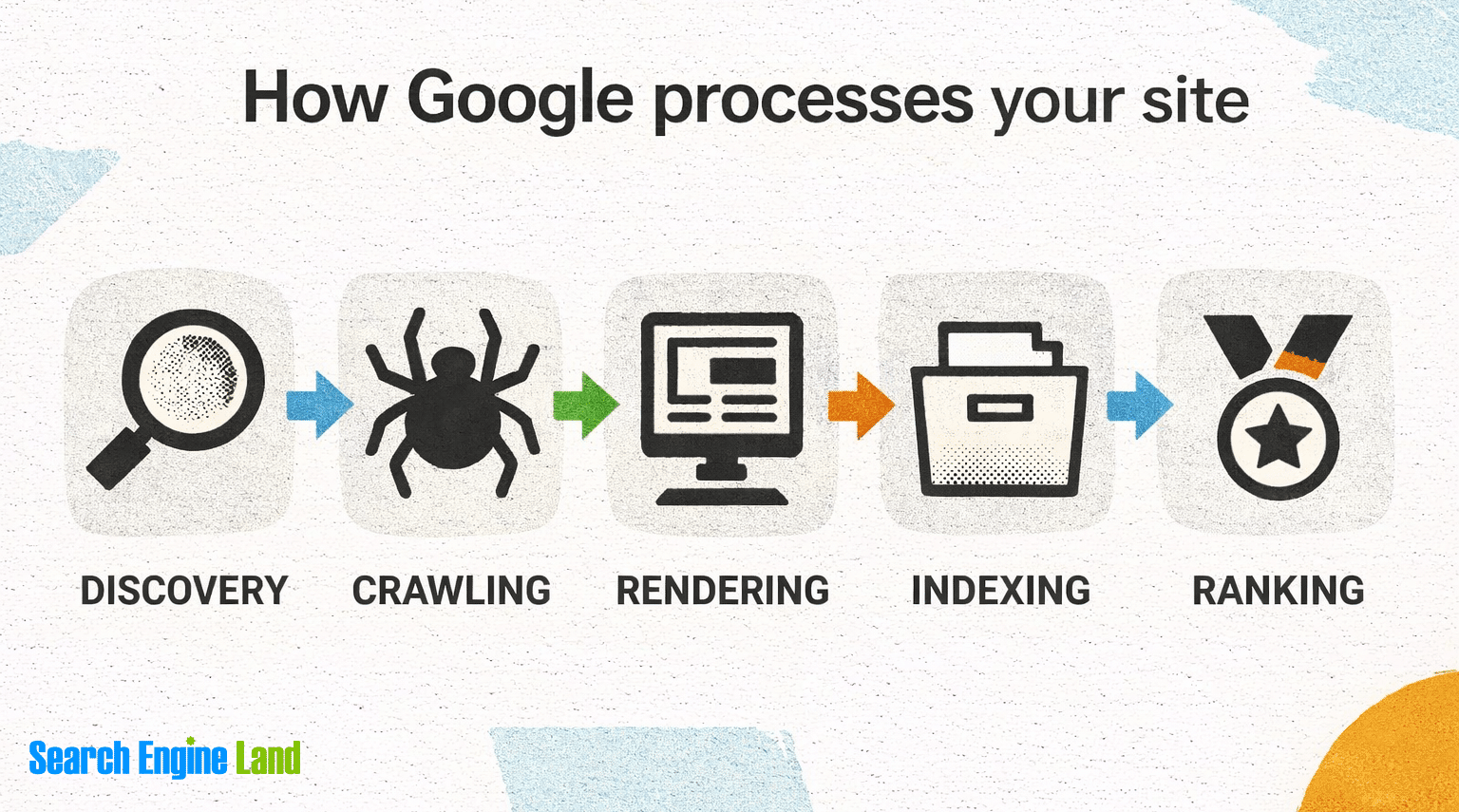
For traditional web search engines like Google, opposed to AI search like ChatGPT, there are four separate stages of search:
- Crawling
- Rendering
- Indexing
- Ranking
This section covers each stage. In the next section, we cover how SEO works in detail.
Crawling: How search engines discover pages on the web
Search engines use crawlers — also known as bots or spiders — to discover pages on the web by following internal and external links and by reading XML sitemaps that signal which URLs should be found, crawled, and considered for indexing.

How to ensure crawlers can move around your website:
- Use a clear, logical site structure with navigation that helps both users and search engines understand how pages relate to one another.
- Ensure all important pages are linked internally (meaning you add a link from one page to another) and not orphaned (pages without any internal links are called orphans).
- Create and maintain an up-to-date XML sitemap and submit it via search engine tools.
- Avoid blocking important pages or resources using robots.txt or noindex directives. For example, you can block your entire site from Google crawlers with a “noindex” directive! This means the site would never be indexed. Sites that aren’t indexed aren’t finable.
- Use clean, descriptive URLs. For example, this article is /guide/what-is-seo; pretty clear. Sometimes you find URLs with meaningless information, like www.example.com/page?id=12345.
- Ensure links are crawlable by formatting them as standard HTML rather than hiding them behind scripts like JavaScript.
- Manage redirects properly to avoid redirect chains and loops.
- Monitor crawl errors and coverage issues using tools such as Google Search Console and Bing Webmaster Tools.
Rendering: How search engines generate pages using code
Search engines render pages by processing HTML, JavaScript, and CSS to understand how content is displayed and whether critical elements load correctly for users.
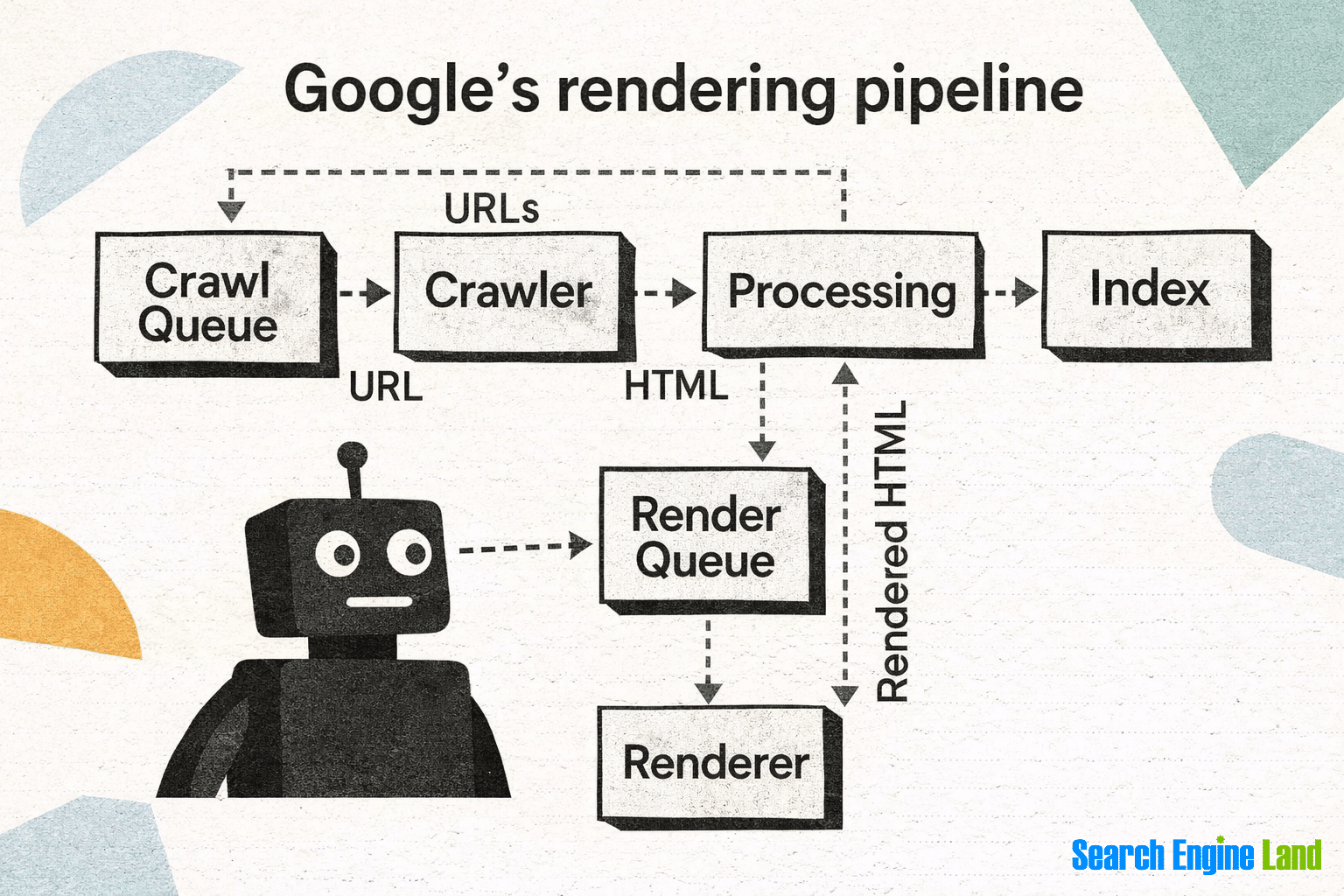
How to ensure your pages render correctly:
- Ensure important content and links are visible in the rendered HTML and not dependent on unsupported or blocked JavaScript.
- Avoid hiding important content that you want indexed behind user interactions that require clicks, hovers, or form submissions.
- Make sure CSS and JavaScript files are accessible to crawlers and not blocked by robots.txt.
- Use server-side rendering or dynamic rendering where JavaScript-heavy frameworks are used.
- Test pages using URL inspection and live rendering tools to see how search engines process your content.
- Monitor for rendering issues caused by slow-loading scripts, broken resources, or third-party software like plugins.
Dig deeper: Server-side rendering: What SEOs need to understand
Indexing: How search engines analyze content
Search engines index pages (include them in search results) by analyzing their content, metadata, and signals to determine whether to store them in a searchable database (though not every discovered page is guaranteed to be indexed).

How to improve your chances of pages being indexed:
- Ensure pages return a valid 200 status code and are not blocked by noindex directives.
- Publish unique, valuable content that clearly satisfies a specific search intent.
- Avoid thin, duplicate, or near-duplicate content that search engines may choose not to index.
- Use canonical tags correctly to signal the preferred version of similar or duplicate pages.
- Ensure important pages are internally linked so they are seen as valuable and discoverable.
- Keep metadata (such as title tags and meta descriptions) accurate and aligned with page content.
- Monitor indexing status and exclusions using tools like Google Search Console and Bing Webmaster Tools.
Dig deeper: Indexing and SEO: 9 steps to get your content indexed by Google and Bing
Ranking: How search engines algorithmize content
Search engines rank pages (determine the order in which indexed pages appear in search results for a specific query) by using complex algorithms that evaluate a wide range of signals (often referred to as SEO ranking factors) to determine relevance, quality, and usefulness for a given search query.

How to improve your ability to rank:
- Align content closely with search intent and fully answer the query better than competing results.
- Demonstrate E-E-A-T through accurate, credible, and well-supported content.
- Optimize on-page elements such as titles, headings, internal links, and structured data.
- Build authority through high-quality backlinks, brand mentions, and positive reputation signals.
- Ensure strong technical performance, including fast load times, mobile-friendliness, and good page experience.
- Keep content fresh and accurate, updating it as topics, user needs, or competitors change.
- Monitor rankings, SERP features, and competitors to adapt strategies as search results evolve.
Dig deeper: How to rank higher on Google (even if you’re just getting started)
How does SEO work?
If you found this page via Google, you likely searched for something along the lines of “what is seo?”
You saw this page because search engines have indexed it and determined that this guide has a strong answer to that query. It’s so strong that search engines deemed it suitable for a top rank in the SERPs.
There are many reasons this guide ranked at the top of search engine results. We’ve had to tick all the SEO elements mentioned under on-page, off-page, and technical SEO.
This guide also carries significant authority. It was published on Search Engine Land, an authoritative website with expertise and experience in SEO topics. We’ve covered all things SEO, big and small, since 2006.
We originally published this guide in 2010, and, since then, it has earned hundreds of thousands of links.
Put simply, these factors (and others) have helped this guide earn a good reputation with search engines, which has helped it rank in the top one to three organic search positions on most search engines for a number of years. It has accumulated signals that demonstrate it is authoritative and trustworthy — and therefore deserves to rank when someone searches for SEO.
But let’s look at SEO more broadly. As a whole, SEO really works through a combination of:
- People: The person or team responsible for ensuring that the strategic, tactical, and operational SEO work is completed
- Processes: The actions taken to make the work more efficient
- Technology: The platforms and tools used
- Activities: The end product, or output
Many other factors influence how SEO works. What follows is a high-level look at the most important knowledge and process elements.
Five critical areas, in combination, make SEO work:

1. Researching
SEO research is the process of gathering and analyzing information before making strategic decisions. Research reduces guesswork and ensures your strategy is based on real data — not assumptions.
To rank effectively, you must understand your audience, the language they use, the competitive landscape, and how search engines interpret intent. Research informs what you create, how you structure it, and where you focus effort.
Some key types of SEO research include:
- Audience research: The study of your target market’s demographics, psychographics, behaviors, and motivations. It helps you understand who your audience is, their pain points, and the questions they need answered.
- Keyword research: The analysis of the search terms people use in search engines. It helps you identify relevant queries to target and evaluate their search demand and ranking difficulty.
- Competitor research: The evaluation of competing websites and their strategies. It reveals their strengths, weaknesses, content gaps, and opportunities you can leverage.
- Brand, business, or client research: The assessment of business goals, positioning, and value propositions. It ensures SEO aligns with broader commercial objectives.
- Website research: A structured audit of your own site. This includes reviewing technical SEO, content quality, link profile, and E-E-A-T signals to identify barriers to performance.
- SERP analysis: The examination of search engine results pages for specific queries. It helps you understand search intent (informational, commercial, transactional, or navigational) and what type of content is most likely to rank.
2. Planning
An SEO strategy is your long-term action plan. You need to set goals — and have a plan for how you will reach them. Think of your SEO strategy as a roadmap. The path you take will likely change and evolve, but the destination should remain clear and unchanged.

Your SEO plan may include things such as:
- Setting goals (e.g. OKRs, SMART)
- Setting expectations (i.e. timelines/milestones)
- Defining and aligning meaningful benchmarks, KPIs, and metrics
- Deciding how projects will be created and implemented (internal, external, or a mix)
- Coordinating and communicating with key stakeholders
- Choosing and implementing tools/technology
- Hiring, training, and structuring a team
- Setting a budget
- Measuring and reporting on results
- Documenting the strategy and process
3. Creating and implementing
Once all the research is done, it’s time to turn ideas into action.
That means:
- Creating new content: Advise your content team, using your content strategy, on what content to create based on your data.
- Recommending or implementing changes or enhancements to existing pages: This could include updating and improving content, adding internal links, incorporating keywords/topics/entities, or identifying other ways to further optimize the page.
- Removing old, outdated, or low-quality content (known as content pruning): This is any content that isn’t ranking well, isn’t driving converting traffic, or isn’t helping you to achieve your SEO goals.
4. Monitoring and maintaining
You need to know when something goes wrong or breaks on your website. Monitoring is critical.
For example, you need to know if:
- Traffic drops to a critical page
- Pages become slow, unresponsive, or fall out of the index
- Your entire website goes offline
- Links break
- Any other potential catastrophic issue occurs
Monitoring is typically done using a combination of analytics platforms, search engine tools, and SEO software that continuously checks your site in the background. Monitoring is typically done using a combination of analytics platforms, search engine tools, and SEO software that continuously checks your site in the background.
These tools simulate how search engine bots crawl, render, and access pages to identify issues early. Then, they surface SEO issues such as crawl errors, indexing problems, and unusual traffic changes — often alerting teams before problems significantly impact users or search visibility.
5. Analyzing, assessing, and reporting on performance
If you don’t measure SEO, you can’t improve it. To make data-driven decisions about SEO, you’ll need to use:
- Website analytics: Set up and use tools (at a minimum, free tools such as Google Analytics, Google Search Console, and Bing Webmaster Tools) to collect performance data.
- Tools and platforms: There are many “all-in-one” platforms (or suites) that offer multiple tools, but you can also choose to use only select SEO tools to track performance on specific tasks. Or, if you have the resources and none of the tools on the market do exactly what you want, you can make your own tools.
After you’ve collected the data, you’ll need to report on progress. You can create SEO reports using software or do them manually.
Performance reporting should tell a story and be done at meaningful time intervals, typically compared to previous periods (e.g., year over year). Reporting frequency depends on the type of website (typically monthly, quarterly, or another interval).
SEO is ongoing
SEO is not a one-time project. It’s an ongoing process.
Search engines constantly update their algorithms. User behavior evolves. Competitors publish new content, earn new links, and refine their strategies. Even your own website changes over time — pages are added, removed, redesigned, or accidentally broken.
Content that once ranked well can become outdated. Search intent can shift. Technical issues can emerge after site updates. Authority signals can strengthen — or erode.
Because of this, SEO requires continuous monitoring, testing, and improvement. Rankings must be protected. Opportunities must be identified. Underperforming pages must be refreshed. Technical health must be maintained.
At the same time, your internal processes should mature. Reporting becomes clearer. Workflows become more efficient. Prioritization improves. What once took weeks should eventually take days.
In short: SEO isn’t something you “finish.” It’s something you manage, refine, and strengthen over time.
How long until I see impact in the search results?
How long SEO takes to impact search results depends on the site, its authority, the number and quality of backlinks it has, as well as many other variables. As a rule of thumb, you may see early improvements in weeks, but meaningful results typically take three to six months, with competitive keywords often taking longer.
SEO strategy and objectives
An effective SEO strategy is driven by business outcomes, not rankings alone. The goal of SEO is to support meaningful objectives such as conversions, purchases, leads, and return on investment (ROI).
Rankings can be a useful indicator of visibility, but ranking in position one for keywords that do not contribute to revenue or business goals has little value, especially when AI Overviews are present.
Why?
Because AI Overviews answer many queries in the SERP, it supersedes the need for users to click through to a website.
This shift to AI-generated answers makes it even more important to focus on intent and outcomes, not just rankings. Successful SEO focuses on attracting the right audience and driving actions that matter to the business.
What metrics should you measure for SEO?
SEO performance should be measured using a mix of metrics that measure visibility, organic traffic, engagement, and outcomes.

Common categories include:
- Visibility metrics: Impressions, rankings, share of SERP features
- Organic traffic metrics: Organic sessions, clicks, and landing page performance
- Business outcomes: Conversions, revenue, leads, assisted conversions, and ROI
- User interaction signals: Engagement metrics such as click-through rate, dwell time, scroll depth, and repeat visits, which can indicate whether content satisfies user intent
Insights from leaked Google internal documentation suggest that user interaction and engagement data may be used to evaluate content quality and relevance at scale. While not all engagement metrics are direct ranking factors, they can reflect whether pages are meeting user expectations — making them valuable indicators for SEO improvement.
Dig deeper: SEO reporting: How to track, prove & improve performance
How is SEO different from SEM and PPC?
Search Engine Marketing (SEM) and pay-per-click (PPC) are two other common terms you will read about often here on Search Engine Land and hear about in the larger search marketing community.
It can also be helpful to distinguish what SEO is from what it is not, and SEO is not a synonym of SEM or PPC, but they are related.
Here, we’ll explain the difference in terminologies, what these abbreviations mean, and how they extend to different disciplines.
SEO vs. SEM
SEM stands for search engine marketing — or, as it is more commonly known, search marketing — is a type of digital marketing. It is an umbrella term for the combination of SEO and PPC (pay-per-click, i.e., Google Ads) activities that drive traffic via organic search and paid search, respectively.
So how do SEO and SEM differ? Technically, they aren’t different — SEO is simply one-half of SEM:
- SEO = Driving organic results and clicks from search engines
- SEM = Driving organic and paid results, and clicks from search engines
- PPC = Driving paid results clicks from search engines
Here’s the best way to think about SEM, SEO, and PPC:
Imagine SEM is a coin. SEO is one side of that coin. PPC is on the flip side.
SEO vs. PPC
PPC stands for “pay-per-click.” It is a type of digital marketing model in which advertisers are charged whenever one of their ads gets clicked on.
Advertisers bid on specific keywords or phrases that they want their ads to appear for in the search engine results.
When a user searches for one of those keywords or phrases, the advertiser’s ad (aka “paid listing”) will appear among the top results.
So again, if we think of search marketing as a coin, SEO and PPC are two sides of the same coin:
- With PPC, the advertiser pays when a search user clicks their paid listing
- With SEO, the search result listing has not been directly paid for, though SEO is sold as a service and the process of optimizing pages and websites takes and investment of both time and money, so it is important to understand that organic search isn’t “free”
Sometimes people debate about “SEO vs. PPC” — which channel is more valuable or has a better return on investment (ROI). However, SEO and PPC are complementary digital marketing channels. Ideally, you should always utilize both (as long as your budget allows for it).
The terms SEM and PPC are used interchangeably in the industry. However, that isn’t officially correct, and it’s not the case here on Search Engine Land.
Whenever we mention “SEM,” it will be because we’re referring to both SEO (organic search) and PPC (paid search).
If you’re curious about the history behind how “SEM” came to mean “PPC” at the exclusion of SEO, you can dig deeper into these articles:
Why is SEO important?
SEO is a critical marketing channel because search engines connect businesses with people who are actively looking for answers, products, or services.
SEO allows you to appear at the exact moment someone expresses a need. That makes it one of the highest-intent marketing channels available.
- According to First Page Sage, organic traffic contributes significantly to traffic, bringing (in most cases) tens of thousands of visitors to websites, and traffic generated from SEO efforts grows each year
- In recent years, the introduction of AI has improved search satisfaction. According to studies on the impact of AI and SEO, 82% of consumers find AI-powered search (which is influenced by SEO) more helpful than traditional SERPs
With such incredible audience reach and improving user experience, it’s no surprise that, in turn, the global SEO industry isset to reach 154.6 billion by 2030.
SEO drives real business results for brands, businesses, and organizations of all sizes. That’s no surprise when you consider that whatever people search for, their journey begins with search, whether they want to go somewhere, do something, find information, research, or buy a product/service.
The act of searching, and the various search user interfaces (be it a typed, voiced, or image query format), have become second nature for internet users worldwide, and the primary way to access the information sought, within the sea of billions of webpages (4.3 billion pages on the indexed web and growing).
SEO is also incredibly important because the search engine results pages (or SERPs) are super competitive — filled with search features (and PPC ads). It is an SEO’s responsibility to gain visibility across all SERP features.
SERP features include:
- AI Overviews
- Knowledge panels
- Featured snippets
- Maps
- Images
- Videos
- Top stories (news)
- People Also Ask
- Carousels
Another reason SEO is critical for brands and businesses? Unlike other marketing channels, good SEO work is sustainable. When a paid campaign ends, so does the traffic it was sending to your site.
SEO, however, is the foundation of holistic marketing, where everything your company does matters. Once you understand what your users want, you can then implement that knowledge across all of your:
- Campaigns (paid and organic)
- Website content
- Social media properties
Advantages and benefits of SEO
SEO helps brands reach people at the exact moment they are searching, across search engines, platforms, and formats. That means it drives sustainable, high-intent organic traffic that supports visibility, trust, and measurable business outcomes such as leads, sales, and revenue.
Here are some of the key advantages and benefits of SEO:
- Increased visibility & sustainable traffic: Higher search rankings drive more clicks from users, and this organic traffic can continue long-term without the ongoing ad spend that’s required in PPC. Regular updates and monitoring will help to maintain these results.
- High-intent audience: SEO attracts users actively searching for solutions to their queries. This, in turn, generates higher-quality leads that are more likely to convert.
- Enhanced credibility & trust: Strong rankings signal authority, helping build user trust, especially when paired with high-quality content and a professional site.
- Improved user experience (UX): Technical SEO best practices encourage fast, mobile-friendly, and easy-to-navigate websites, improving engagement and satisfaction.
- Better ROI & lower acquisition costs: Over time, once rankings are secured, SEO can generate leads and sales more cost-effectively than paid advertising, because there are no ongoing costs, though initial investment and ongoing optimization are needed.
- Long-term value & compounding returns: Well-optimized content and a growing authority score amplify results over time, benefiting multiple channels and campaigns.
- Measurable insights: Analytics tools such as Semrush, Google Analytics, and Search Console provide actionable data on traffic, user behavior, and conversions, informing smarter business decisions.
- Local growth & multi-channel impact: Local SEO improves visibility for nearby searches, while strong organic performance can support broader marketing efforts, including PR and paid campaigns.
- Competitive advantage: Effective SEO helps outrank competitors, capture market share, and establish a lasting online presence.
- Customer journey coverage: SEO content can reach users at every stage — from awareness to consideration to decision — when supported by a strategic content calendar.
How is SEO different from AI search and GEO?
SEO constantly evolves in a number of ways, perhaps most importantly because it is a service and a practice employed at the exact level of how humans interact with information on the web.

Yet it’s important to consider the web, and search engines, in the wider context of society.
Libraries, for example, have existed for thousands of years. There is both documentary and archaeological record from as far back as the seventh century BC of the existence of these places to house the collected wisdom of cultures.
In this context, the web (as an information repository and record of dank memes) is still in its infancy. In fact, Google, as a search engine, has only existed since September 1998.
The web, and the ways we search and retrieve what we want from it, are new in the context of human memory and behavior.
We access search engines through technological devices like computers, mobile phones, and home assistants. As technology evolves, so does our behavior in how we use and apply it.
This has implications for how search engines evolve their product capabilities and appearances, which in turn means adaptive changes for what constitutes SEO. It’s an ever-changing field!
Here are some of the main ways SEO evolves:
Adapting with technology
We have mentioned that technical SEO is one of the main types (or focuses) within SEO. In the past decade, significant changes have occurred in technology, shifting the focus of SEO work to include tasks and tactics that didn’t even exist a decade ago.
- AI-driven search results: Just recently, significant changes in how AI drives some search results and how often such results appear have occurred, particularly for Google, with AI Overviews and Bing’s generative search results.
- Mobile-first indexing: A decade ago, the SEO industry focused on making websites that were optimized to work well on mobile phones, so that they would appear in search engines when used on a mobile phone. By 2021, 63% of Google searches in the US occurred on a mobile phone. Now, Google’s Index favors a site’s mobile performance as its lead indicator, and mobile-responsiveness is embedded into modern-day SEO. You wouldn’t think about creating a site that didn’t function well on mobile.
- Speed and user experience: As device capabilities improve, so do WiFi’s capabilities in terms of speed and penetration — and, thus, so too our behaviors and expectations of the services we consume. If we consider what felt normal a decade ago when using a mobile phone, for example, we tend to get very frustrated as consumers when we experience anything like the slow-to-load pages with missing content of the early, dial-up internet.
In the three specific areas of rapid change above, SEO practices must keep pace, or they will fail. Within each of these three areas, there are numerous component changes, features, and technologies that we now consider everyday parts of SEO.
Let’s take a look at those.
Adapting to social media search
Search is foundational to how people find information, but it no longer happens in just one place.
Search is happening everywhere, including search engines other than Google (like Microsoft Bing) and social media platforms (like YouTube, TikTok, Instagram, and more).
According to Statista, searchers in the US prefer to search only on mobiles, and the majority (66%) use a mix of search engines and social media.

Another interesting component is the growth of search on social platforms, particularly TikTok, as a place to find both products and knowledge (think: “how to do X” types of searches).
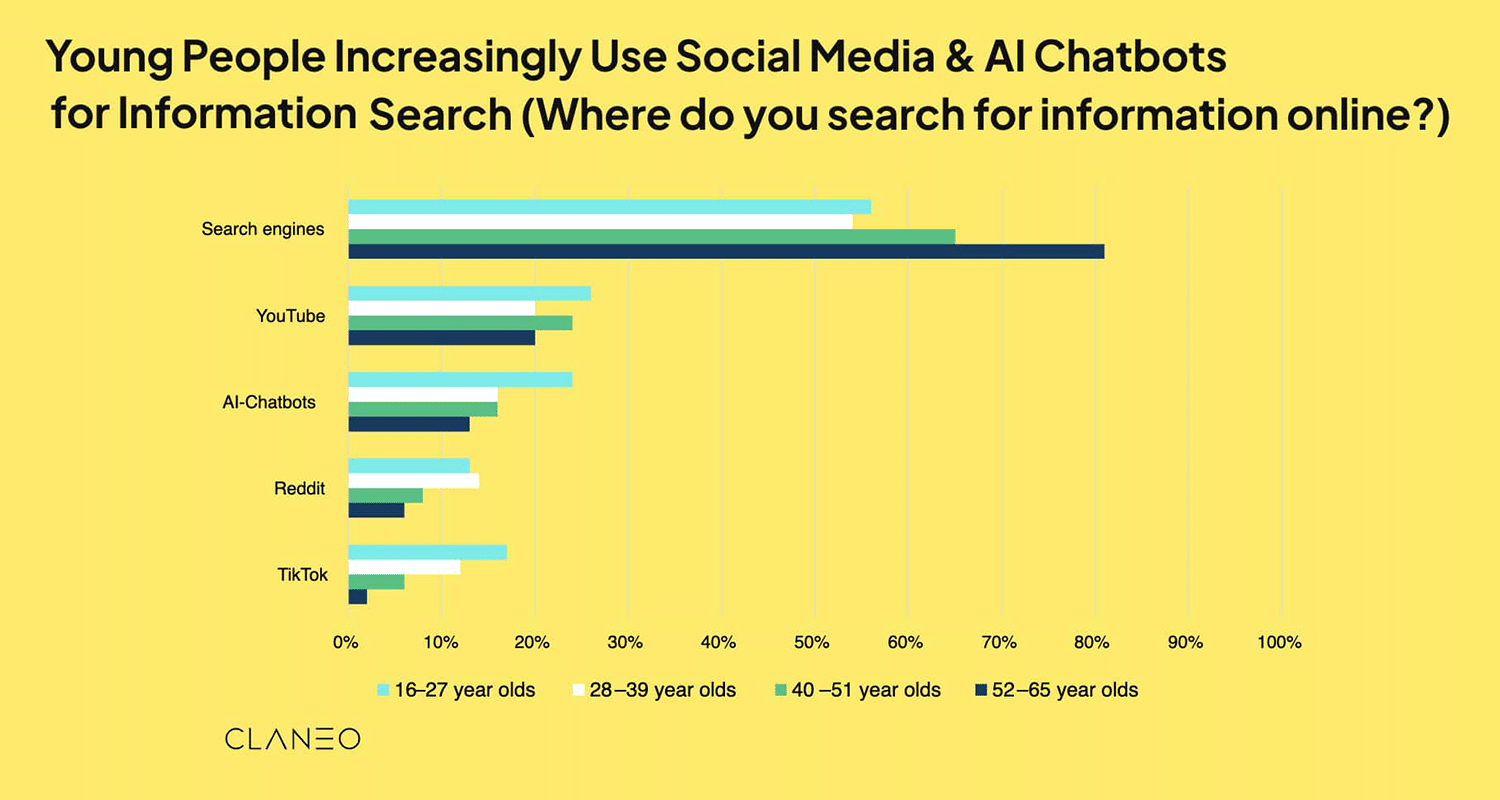
In fact, young people (aged 16 – 27) are using YouTube and AI-Chatbots as well as TikTok more than any other demographic.
Does this mean that SEO specialists are now responsible for all the search on all the platforms?
Not exactly.
But it does mean that all marketing teams should be working together.
Note: This article on The Future of SEO covers platform fluency and how search teams across channels can work together to benefit business and SEO.
Adapting to generative engine search
Generative engine optimization (GEO) is an emerging specialty within content optimization and, in smaller ways, technical optimization. GEO is about optimizing your content and site for visibility in AI-driven search engines (or answer engines), including Google’s AI Overviews and Gemini, OpenAI’s ChatGPT and SearchGPT, Microsoft Copilot, and Perplexity.
It’s important to remember that traditional search engines are still huge, and some of the news may be overhyping AI. Here’s what Rand Fishkin at Sparktoro said:
“Data doesn’t lie: over 20% of Americans are now heavy users of AI Tools (employing them 10X or more each month), and nearly 40% use one AI tool 1X+/month. Despite this massive growth, traditional search engines aren’t going anywhere: 95% of Americans continue to use them each month, and 86% are heavy users.
As Semrush (who partners with Datos for their clickstream panel) recently pointed out, when new users adopt ChatGPT, their quantity of Google searches spikes, and remains higher-than-before even months later.”
To adapt to generative engine search, SEO now needs to account for multiple types of AI-driven discovery and answer experiences, including:
- AI Overviews in Google Search: AI-generated summaries that appear at the top of some search results, often pulling information from multiple authoritative sources
- Large Language Model (LLM) search experiences: Tools such as ChatGPT, SearchGPT, Microsoft Copilot, and Perplexity that generate conversational answers using a mix of training data, live search, and cited sources
While search experiences — and the ways AI systems choose which sources to cite — may differ, they tend to reward the same core fundamentals:
- Clear, well-structured, and factually accurate content
- Strong topical authority and brand trust signals
- Content that directly answers questions in a concise, unambiguous way
In practice, GEO does not replace SEO. It extends it — requiring marketers to think beyond rankings alone and optimize for visibility wherever and however users search for information.
Dig deeper: The future of SEO is now: Growth & visibility
Adapting to society
While technology (and the way we use it in everyday life) plays a major role in societal change, broader shifts influence search behavior. These changes require SEO strategists to evolve and adapt.
Here are two significant examples:
- Macroeconomics: Local and global economic recessions, war conflicts, and famine have significant effects on large businesses, supply chains, interest rates, credit availability, and consumer income and spending. All of these can also have both direct and indirect effects on human behavior that require strategic changes in marketing. SEO is a marketing discipline and must adapt strategically when economic conditions are tough and changing.
- The COVID pandemic: The COVID pandemic saw a hard and fast change in consumer behavior driven by public health mandates across the world. So many businesses experienced rapid change as a result of the COVID pandemic, for example, some experienced growth as online shopping increased during this time, and this required significant changes to online and offline marketing strategies at a rate previously unheard of.
SEO has taken center stage in recent years as both technology and society have evolved.
As a marketing discipline, SEO is reactive, and it adapts to broader societal trends:
- How people research before buying
- How they evaluate trust
- How brands build authority
- How privacy expectations shape data usage.
Strategy must account for both technological change and human behavior.
Not only that, but there’s an ever-changing algorithm that can be influenced by societal changes. For example, during COVID-19, there were significant updates to the way Google presented information and what it prioritized for health queries. Some healthcare sites suffered as a result of Google prioritizing content from what it deemed to be the most trustworthy, expert organizations that focused on global health issues.
As a career path, SEO is a sustainable choice. This marketing tactic stands the test of time, and SEO specialists continuously learn and pivot. SEO isn’t static. It’s a reflection of how people find information, and as that changes, SEO changes with it.
SEO as a service
The SEO market was predicted to grow from $75.13 billion in 2023 to $88.91 billion in 2024, reaching $170 billion in 2028 at a CAGR of 17.6%, according to the 2024 Research and Markets SEO Services report.
It is no wonder, then, that SEO is also a well-established professional service, considering the ubiquity of search engines and search as an activity, combined with mobile phones’ capabilities and the ever-changing economic climate.
SEO is a marketing discipline and a job title. You can “do” SEO as well as “be” an SEO (search engine optimizer).
There are myriad roles and responsibilities within SEO, such as on-page, off-page, and technical, as well as many specialisms, such as ecommerce SEO, enterprise SEO, International SEO, local SEO, that reflect the different types of SEO and the skills and capabilities required. These are outlined under SEO specialties above.
Understanding how to get started with a career in SEO can be slightly overwhelming at first. Unlike more established professions (e.g., law, accounting, nursing), there aren’t many universally established and recognized formal higher-education courses or professional qualifications. Additionally, there are a lot of data-skill requirements, as much of the practice of optimization requires analyzing performance status and planning how and where to improve against the metrics that matter.
Data sources like Google Analytics and Google Search Console are free and the best place to get started with understanding website performance data.
There are also comprehensive paid platforms, such as Semrush, that offer limited free tools. These can be especially useful for beginners who want to explore SEO and performance data without committing to a subscription. If you find value in them, you can always upgrade later for deeper insights and expanded access.
Here are some of the free tools available:
- Free SEO Checker
- Free Keyword Research Tool
- Free Keyword Difficulty Checker
- Free Keyword Ranking Checker
- Free Keyword Generator
- Free Backlink Research
- Free Website Traffic Checker
- Free Website Authority Checker
- Free SERP Checker
- Free Competitor Analysis Tool
Learning a new discipline may seem daunting at first, but there are many ways to get started. We’ve collated a number of further resources below.
How to learn SEO
Now that you understand more about what SEO is and how it works, what’s your next step for learning more?
Beginner SEOs benefit from reading (or, if you prefer, watching or listening to) the latest SEO news, research, and best practices.
But the truth is, the learning never stops. Keeping up with this ever-changing and exciting industry should become a regular habit.
The industry makes learning easy.
SEO has a strong culture of shared learning. Experts regularly share insights through blogs, conferences, webinars, podcasts, seminars, LinkedIn posts, local meetups, and global-scale events. Try looking for events in your area and attend.
Notable global events include:
- Brighton SEO (also hosted in San Diego)
- MozCon, hosted in London and New York
- WTS Fest, hosted in London, Portland, and Philadelphia
Next, let’s review some trusted resources and tips to help you grow as an SEO professional.
Search Engine Land’s SEO resources
Search Engine Land has been covering SEO since 2006. In addition to news stories written by our editorial staff, Search Engine Land publishes articles contributed by a diverse group of subject matter experts featuring helpful SEO tips, tactics, trends, and analysis.
We’re biased, but we highly suggest you sign up to receive Search Engine Land’s free email newsletter featuring a roundup of the latest SEO news and insights every weekday.
Search Engine Land also has multiple categories on topics dedicated to specific areas and platforms, which you may find helpful:
- All SEO
- Bing SEO
- Content SEO
- Ecommerce SEO
- Generative Engine Optimization (GEO)
- AI SEO
- Enterprise SEO
- Google: E-E-A-T
- Google algorithm updates
- Google Search Console
- Google search features
- Link building
- Local SEO
- News SEO
- Technical SEO
Search Engine Land’s Periodic Table of SEO Elements
Search Engine Land’s interactive Periodic Table of SEO is a resource meant to help you visualize the essential individual elements that combine to create an optimal SEO strategy, with sustained effort.

Google’s SEO resources
- Google Search Essentials: Google explains technical requirements, spam policies, and key best practices in this guide
- SEO starter guide: An overview of SEO basics, according to Google’s best practices
- Search quality evaluator guidelines: This document explains how Google instructs human raters to evaluate the quality of its search results by examining the experience, expertise, authoritativeness, and trustworthiness of content and websites
- Top ways to ensure your content performs well in Google’s AI experiences on Search is a guide that explains Google’s tips for Google’s AI search experiences
Developing your SEO skills
One of the surest ways to learn SEO is to experiment. Hands-on experience is one of the absolute best ways to advance your skills and deepen your SEO knowledge.
How do you do that? Try building your own websites based on topics you are passionate about. Try out various SEO tactics and techniques. See what works and what doesn’t.
SEO requires a whole breadth of skills. Dig deeper into some of those in the 13 essential SEO skills you need to succeed.
Another way to advance your career is by attending a search conference. For example, we here on the Search Engine Land team program the Search Marketing Expo (SMX) conference series, which has a dedicated SEO track that dives into various aspects of SEO and features some excellent speakers and presentations. SMX Advanced takes place in June each year and SMX Next in November.
Beyond that, there are several other options (both free and paid) to learn SEO:
- Websites, blogs, and publications
- Master classes
- Books and ebooks
- Videos
- Podcasts
- Webinars
- Conferences, events, and meetups
- Courses
- Training and certification programs
- Groups (e.g., social media, Slack)
- Newsletters
- Following experts on social media.
- Forums
Just be careful. While there are many reliable resources, you (or your clients) will eventually discover outdated, incorrect SEO information, or what we think of as spammy and manipulative GEO and SEO. Spammy tactics are methods that work now but likely won’t in the future. They’re usually tactics that “game the algorithm” rather than help the user. A funny, and very old spam strategy was adding keywords in white text so your site said the keyword the most without disrupting the reader; that wouldn’t fly in modern-day search!
Track, optimize, and win in Google and AI search from one platform.
So what’s the bottom line? There are no “universal” truths or big secrets to SEO. The truth is, you have to put in the work in all the phases of SEO to grow your visibility, clicks, traffic, authority, conversions, sales, and revenue.
Start by understanding the basics, such as:
Explore more on
Editorial disclosure
Search Engine Land is owned by Semrush. We remain committed to providing high-quality coverage of marketing topics. Unless otherwise noted, this page’s content was written by either an employee or a paid contractor of Semrush Inc.
About the author